⚡ Hermes
An advanced reasoning assistant for Companion Hub. Hermes is a conversational agent harness that runs on your hardware and connects to your Companion Memory, giving you a private assistant that actually knows your context — and forgets nothing you don’t want it to.
This is one of the two agent frameworks the Onboarding Wizard offers during first-time setup (the other is OpenClaw, the recommended default).
Already running your own Hermes? You can connect it to Companion Hub and Companion Memory directly. This app builds on the official Hermes Agent image rather than forking it, so the same endpoints and credentials work against your own install. See Connect Hermes.
What it does
- Deep conversational reasoning — powered by the model you selected in the wizard (local Ollama models by default; optional cloud API keys under Advanced), with a terminal-style dashboard for working sessions.
- Remembers through Companion Memory — with Memory connected, Hermes receives your profile context, recalls relevant memories per request, and syncs turns back into your timeline.
- Speaks the Companion tool catalog — typed access to search, knowledge, people, places, calendar, and media instead of raw database queries.
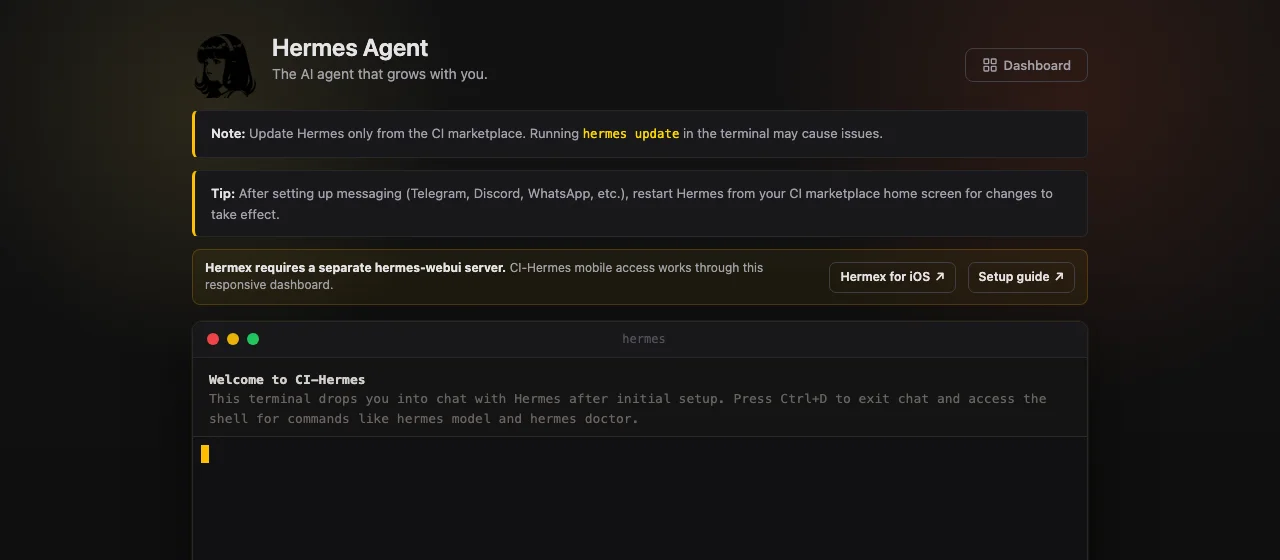
The dashboard drops you straight into chat with Hermes after initial setup — press Ctrl+D to exit chat and reach the shell for commands like hermes model and hermes doctor.
Install & availability
| Hub App Store | Search Hermes → Install |
| Works with | Companion Memory (optional but strongly recommended) |
| Model backend | Your Hub’s configured inference (Ollama by default) |
If your Hub has Companion Memory and this app is not yet connected to it, the app puts a Give Hermes long-term memory screen in front of itself. Sign in with Companion Intelligence approves a key for this app, Maybe later asks again the next time you open it, and Don’t ask again stops the question. See Connect Companion Agents for what the key can do.
Mobile access
CI-Hermes has a responsive web terminal and dashboard that you can open from an iPhone through Hub’s Private VPN or Web exposure mode.
The independent Hermex iOS app currently targets the separate
nesquena/hermes-webui server API, not the official hermes dashboard
packaged by CI-Hermes. Do not enter your CI-Hermes URL or Hub credentials into
Hermex.
See the current Hermes mobile options and Hermex compatibility details.
Memory integration controls
With Memory connected, each request pulls profile context and recalled memories in, and each turn syncs back out:
flowchart LR
    Y["You<br/>terminal dashboard"] <-->|"chat"| H["Hermes<br/>on your Hub"]
    H <-->|"reasoning"| L["Model backend<br/>Ollama by default"]
    M["Companion Memory"] -->|"profile context<br/>CI_MEMORY_CONTEXT_ENABLED"| H
    M -->|"per-request recall<br/>CI_MEMORY_RECALL_ENABLED"| H
    H -->|"turn sync · new memories<br/>CI_MEMORY_TURN_ENABLED · CI_MEMORY_WRITE_ENABLED"| M
    H -->|"typed intents<br/>CI_INTENTS_ENABLED"| M
Most of these are the same operator controls as OpenClaw. The Memory plugin in Hermes reads them from its environment. The app’s install form does not expose them, so they apply where you control Hermes’ environment, such as your own Hermes install (see Connect Hermes):
| Variable | Controls |
|---|---|
CI_MEMORY_CONTEXT_ENABLED | Profile context block injection |
CI_MEMORY_RECALL_ENABLED | Per-request memory recall |
CI_MEMORY_TURN_ENABLED | Conversation-turn sync back to Memory |
CI_MEMORY_WRITE_ENABLED | Whether the agent may write new memories |
CI_MEMORY_DELEGATION_ENABLED | Subagent-delegation outcomes recorded as a memory note (also needs CI_MEMORY_WRITE_ENABLED) |
CI_INTENTS_ENABLED | The typed intent catalog |
CI_INTENT_TOOLS_ENABLED | Catalog intents registered as callable tools (also needs CI_INTENTS_ENABLED) |
CI_MEMORY_RECALL_SYNC | Recall runs against the message you just sent (default). Set to false to use Hermes’ queued model, where turn N gets the recall from turn N-1 and the first message gets none |
Switching frameworks: OpenClaw and Hermes behave equivalently against the same Companion Memory contract, so you can switch in Settings later without losing memory — your data lives in Companion Memory, not in the agent.