Pool two Hubs
Pair two Companion Hubs over your tailnet so an app on one can be answered by the other, then prove it with a model that exists on only one of them.
Time: ~25 minutes, plus the model download · You’ll need: two Hubs running Companion Hub 0.3.0, both on the same tailnet with Tailscale connected, HTTPS Certificates and MagicDNS enabled for it, a sign-in to both dashboards, and Ollama on both machines
The two Hubs are called Hub A (where you ask for the model) and Hub B (the one that has it). The names below, hub-a.example-tailnet.ts.net and hub-b.example-tailnet.ts.net, are placeholders for your own tailnet names. Each step has a dashboard route and a terminal route, and ends with a check.
flowchart LR
    subgraph prep["Get ready"]
        direction TB
        A["Both Hubs reachable<br/>on the tailnet"] --> B["Hub B: generate<br/>a PIN"]
    end
    subgraph pair["Pair"]
        direction TB
        C["Hub A: enter the PIN,<br/>select Pair"] --> D["Hub B: check the<br/>fingerprint, approve"]
        D --> E["Both say<br/>Connected"]
    end
    subgraph prove["Prove it"]
        direction TB
        F["Pull a model on<br/>Hub B only"] --> G["Ask Hub A<br/>for that model"]
        G -->|"X-Hub-Pool-Served-By<br/>names Hub B"| H["Pooling works"]
    end
    prep --> pair --> prove
What you’ll have at the end
- Two Hubs that list each other under Paired Hubs as Connected
- A request sent to Hub A for a model only Hub B holds, answered by Hub B’s engine, with proof on the response and in Recent routing on both Hubs
- A clean way to switch pooling off or undo the pairing
This tutorial walks one path. For what every label and switch does, and for the limits of pooling — it adds capacity in whole requests, not one bigger GPU — see Hub Pool.
Check that both Hubs can be reached
Pairing, approval, and every health check go to https://<device>.<tailnet>.ts.net/, so each Hub has to be connected to the tailnet and published at that name. On each Hub’s machine, run:
cihub pool doctorThe command is read-only. Read section C: Tailnet should say the Hub is connected as its tailnet name, and Tailscale serve should say that name reaches the Hub. A failure there comes with the command to run; on a Linux host it is usually a one-time tailscale set --operator command. The first line of the report ends with all … checks passed when nothing needs attention. A Hub cannot reach its own tailnet name, so Tailscale serve may pass with a note that it was confirmed from the local Serve settings rather than by a request. That is still a pass; step 3 is the first real test across the tailnet. If cihub is not on your PATH, see Using the CLI.
In the dashboard, Settings → Network shows the same thing: Private VPN (Tailscale) reads Active with a Tailscale IP. If it shows Tailscale refused the Hub’s changes, copy the command it prints and run it once on that machine; it names the account the Hub runs as.
Check: on both Hubs, Tailnet and Tailscale serve pass, and Private VPN (Tailscale) reads Active. Do not continue until both do.
Generate a PIN on Hub B
The PIN proves you are at Hub B’s screen. On Hub B, open Settings → Network → Hub Pool, find the Pairing PIN block, and select Generate PIN.
From a terminal on Hub B instead:
cihub pool pairing-pinThat prints the six digits, when they expire, Hub B’s key fingerprint, and the exact cihub pool pair command to run on Hub A.
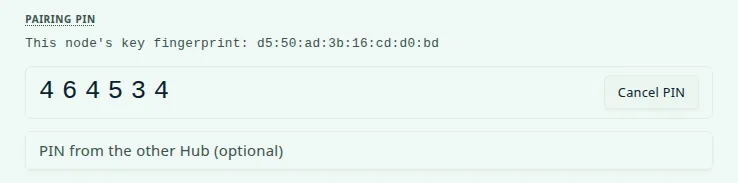
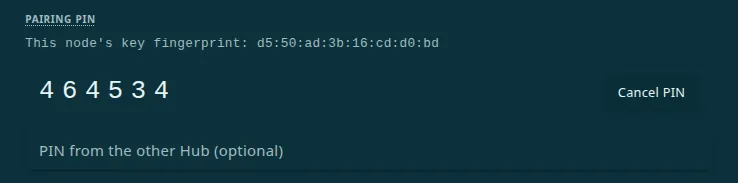
Check: six digits are on screen. They work once, for ten minutes, and generating another replaces them. Hub 0.3.0 leaves the digits showing after they expire, so note the time.
Send the request from Hub A
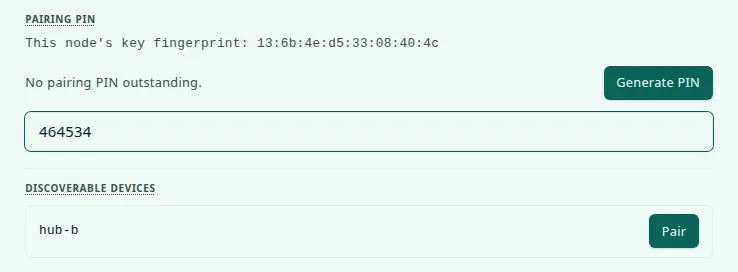
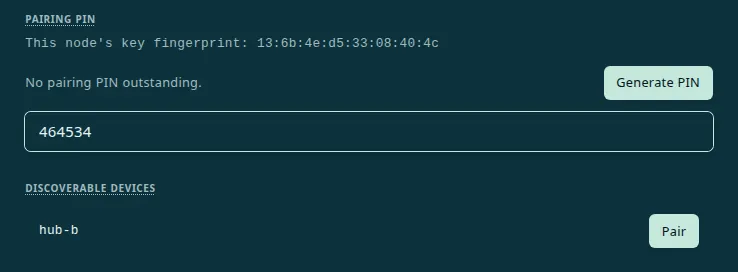
On Hub A, open Settings → Network → Hub Pool. Discoverable devices should list Hub B by its device name; the list can take a few seconds to appear because the Hub checks each candidate. Type the six digits into PIN from the other Hub (optional) — a shorter entry is dropped without a warning in 0.3.0 and the request goes out without a PIN — then select Pair next to Hub B.
From a terminal on Hub A:
cihub pool pair hub-b.example-tailnet.ts.net --pin 123456The command asks [y/N] before it sends; answer y, or add --yes.


Check: the request moves to Pending requests and reads Waiting for hub-b.example-tailnet.ts.net to approve, with a Cancel request button. If the request is not listed a few seconds after you select Pair, it failed, even though Hub 0.3.0 flashed Pairing request sent. Jump to If it doesn’t work.
Approve it on Hub B
On Hub B, Settings → Network → Hub Pool → Pending requests shows hub-a.example-tailnet.ts.net, and, because the request carried the PIN, a Key fingerprint. On Hub A, the same card’s Pairing PIN block shows This node’s key fingerprint. They should match. Then select Approve.


From a terminal on Hub B:
cihub pool peers              # find the row marked "in" and "pending"; note its id
cihub pool approve <id>
The terminal does not print the requesting Hub’s fingerprint, so use the dashboard if you want to compare it.
Check: a Peer connected. message appears on Hub B, and its Paired Hubs table lists Hub A as Connected.
Confirm that both sides say Connected
Look at Hub A. Its page refreshes every 15 seconds, so give it a moment. Pending requests should be empty, Hub B should be under Paired Hubs as Connected, and the badge at the top of the card should read Routing.
cihub pool statusOn both Hubs the Pooling line should read active, and the Peers line should show one connected.


Check: both Hubs show Routing and one Connected peer. If Hub A still says Waiting for … to approve a minute after you approved, see I approved, but the other Hub still says Waiting.
Put a model on Hub B only
The proof needs a model Hub A does not have. If it had the model, it would serve the request itself, because a Hub prefers its own engines. On Hub B’s machine, pull a very small one:
ollama pull smollm2:135mWithin a minute or two, What the pool can serve on Hub A lists smollm2:135m, available on Hub B only. Hub B’s models arrive with each health check, which runs every 30 seconds by default.
Check: on Hub A, smollm2:135m appears in What the pool can serve under Hub B’s name, and the summary says on one node only.
Ask Hub A for it
Now send a request to Hub A for a model it does not hold. From Hub A’s machine:
curl -s -D - -o /dev/null http://localhost:5002/api/inference/pool/v1/chat/completions \
  -H "Content-Type: application/json" \
  -d '{"model": "smollm2:135m", "messages": [{"role": "user", "content": "Say hello in five words."}]}'
The first request makes Hub B load the model, which can take a minute. The command prints only the response headers.
On Windows PowerShell, curl is an alias for a different command. Use
curl.exe, and put the JSON in a file you pass with -d "@request.json". A
request from outside the Hub’s own network needs an inference key; see Hub
Pool.
Check: the headers include the line below, with Hub B’s tailnet name. A value of local means Hub A served it, so the model is not exclusive to Hub B.
X-Hub-Pool-Served-By: hub-b.example-tailnet.ts.netSee it in Recent routing on both Hubs
The routing log refreshes every 15 seconds. On Hub A, Recent routing shows Sent to hub-b.example-tailnet.ts.net with smollm2:135m and the time to first response. On Hub B, the same list shows Served for hub-a.example-tailnet.ts.net.
cihub pool log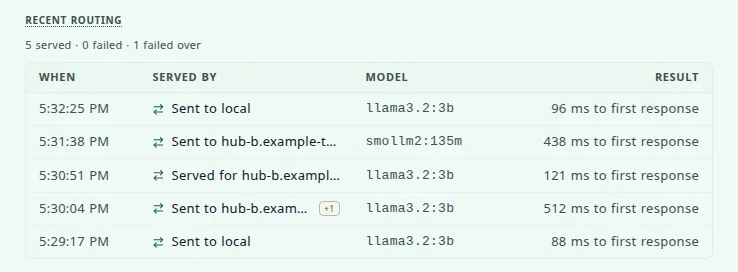
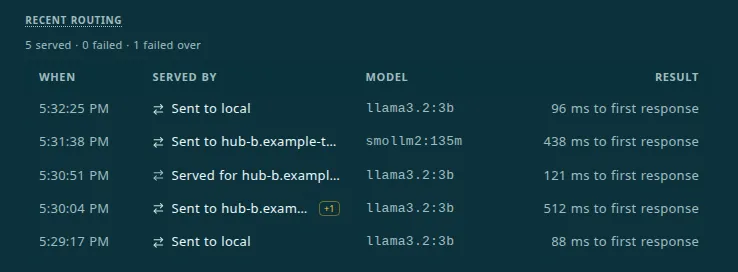
Check: one request, two rows: Sent to Hub B on Hub A, Served for Hub A on Hub B. That is pooling working end to end.
If it doesn’t work
| Symptom | Cause and fix |
|---|---|
| Hub B is not listed, or Pair flashes Pairing request sent. but nothing appears under Pending requests | The other Hub cannot be reached at https://<name>/. Re-run step 1 on Hub B, and check HTTPS Certificates and MagicDNS. The dashboard does not show the reason; it is in Hub A’s log under Settings → Logs. A refused PIN reads Peer refused the pairing PIN there — generate a fresh one and retype all six digits. |
| Hub A says Waiting for … to approve after you approved on Hub B | When you approve, Hub B calls Hub A’s https://<name>/ to finish, and that call is not retried. Hub A is not reachable or published. Fix it with step 1 on Hub A, then Cancel request on Hub A, Unpair on Hub B, and start again. |
Both say Connected, but the request fails with No pool node currently has model | The model is not listed yet (wait for Hub B’s next health check), the name differs (it must match exactly, tag included), or Hub B’s row shows Disabled or a paused tag. |
The response says X-Hub-Pool-Served-By: local | Hub A holds that model too, and a Hub prefers its own engines. Ask for a model that only Hub B has. |
More cases, including Unreachable and Needs re-pair, are in Hub Pool troubleshooting.
Undo it
- Keep the pairing and stop pooling. On either Hub, turn off Pool inference with paired Hubs under Controls. Every request stays on that Hub, and turning the switch back on needs no new approval.
- Remove the pairing. On either Hub, select Unpair next to the other Hub and confirm. The Hub tells the other one to drop its half; if that Hub was off, unpair there too. From a terminal:
cihub pool unpair <id>. - Remove the test model. On Hub B’s machine,
ollama rm smollm2:135m. - Cancel a PIN you did not use. Select Cancel PIN, or run
cihub pool cancel-pin.
Next
- Hub Pool — every control, the trust model, and the command reference
- Tailscale private networking — HTTPS Certificates, Serve, and the operator step
- Resource Monitor — the paired Hubs’ models, queues, and measured speed