Asking Other Companions
Most of the questions you ask the people in your life are really questions about their memory:
- “Do you have photos of us from the lake trip?”
- “Do you know anyone at Acme?”
- “Free for lunch on Friday?”
Today those go over the slowest protocol there is: interrupt the person, wait, hope they remember, get an answer nobody can source. Asks let your Companion put the question to their Companion — and get back a truthful answer that the other person stayed in control of.
This page is the guide to that feature as it works in Companion Memory 2026.10.2, screen by screen. It also says plainly what does not work yet, because parts of it do not, and finding that out by hitting it is worse than being told.
The screenshots are captures of the Asks page with example data: one appliance with three accounts, and a few Asks sent between them. Accounts on the same appliance are not shown by name. A card reads Peer … followed by the last characters of the account’s id, and this page calls the people behind those ids Maya and Jordan.
What an Ask is
An Ask is one question, addressed to one person, answered by their Companion under their rules.
Nothing about it looks like a database query, and that is deliberate. When someone asks you something:
- The question arrives at your appliance.
- Your consent rules decide whether it may be answered at all.
- If it may, the search runs locally, as you.
- Only a filtered answer — never your raw records — goes back.
Their Companion does the same for you. Neither box gets a copy of the other’s memory, and no cloud service carries the question or the answer between them.
Why “review by default”
The floor of the whole system is this: an Ask that no rule of yours covers is never answered automatically. It waits for you.
That sounds obvious until you notice how much it costs. It means the useful case — a friend’s assistant quietly checking whether you are free on Thursday — needs you to have decided about it in advance, and if you have not, someone waits on you.
It is worth it because the two mistakes are not the same size. If review is the default and you are slow, someone waits. If automatic were the default and a rule is slightly wrong, something left an appliance that holds your messages, your photos, your calendar, your health notes and your finances, and it left permanently — you cannot un-tell a person a thing. One of those is recoverable and one is not, so the default sits on the recoverable side.
You will see this stated at the bottom of your own grant list, as a row that cannot be edited:
Everyone else — Ask first — Nothing is answered without you, ever.
Where to find it
Asks lives in Companion Memory, under Saved Searches in the left rail. Open the rail (hover it, or pin it open), select the chevron beside Saved Searches, and choose Asks (the speech bubble with a question mark). Or go directly to /asks. It sits beside Saved Searches because both are a bounded search that runs as you — a share is a link you mint, and an Ask is a request someone else sends. It is on by default.
Six tabs, and it is worth knowing which is which before you need them:
| Tab | What it is for |
|---|---|
| For you | Questions waiting on your decision. The number in the tab is how many. |
| Ask someone | Compose a question of your own. |
| Sent | Questions you have asked, and where they stand. |
| Who can ask me what | Your standing rules — who may ask what, and how it gets answered. |
| People I’m linked to | The people whose Companions you have linked, and how much each may be told. |
| What I’ve shared | The record of every answer and every refusal. |
How much an answer is allowed to say
Every answer sits somewhere on a ladder, from “nothing” to “everything that matched”. These are the names the rules use:
| Rung | What the other person gets |
|---|---|
| Nothing | No answer at all |
| Just yes or no | A single bit |
| Just how many | Whether anything matched, never how many |
| A summary only | One fixed sentence, no number |
| Only what I pick | Item references. Defined in the rules; no kind of question returns them yet |
| Everything that matched | Item references. Defined in the rules; no kind of question returns them yet |
Four separate things cap where an answer lands, and the narrowest one wins:
- Your choice at the moment you approve it. The “answer with less” buttons on the card.
- The standing rule that covered it, if one did — each rule carries its own ceiling.
- The other person’s trust tier, which caps every answer they will ever get from you, no matter which rule authorised it.
- The kind of question asked. “Do you know…?” cannot be answered with photographs even if you would happily send them.
These are ceilings. No kind of question returns item references in this release, and nobody is told how many items you held back. The most any tier gets today is a yes or no, a count or a summary, set by the kind of question.
Why a ceiling can never be raised by accident. The ceiling that applied when you consented is written down with the Ask, and later re-checked against your rules as they stand at the moment of answering — whichever is narrower is the one that applies. This closes a real bug that used to exist: revoking a grant, the gesture that means “stop sharing”, could make an answer larger, because it removed the narrow rule that had been holding it down. Now revoking can only ever narrow. If you change your mind, changing it costs you nothing.
Walkthrough: Maya asks for photos from the lake trip
Maya’s Companion sends the question. Yours does not answer it — it puts it in front of you.
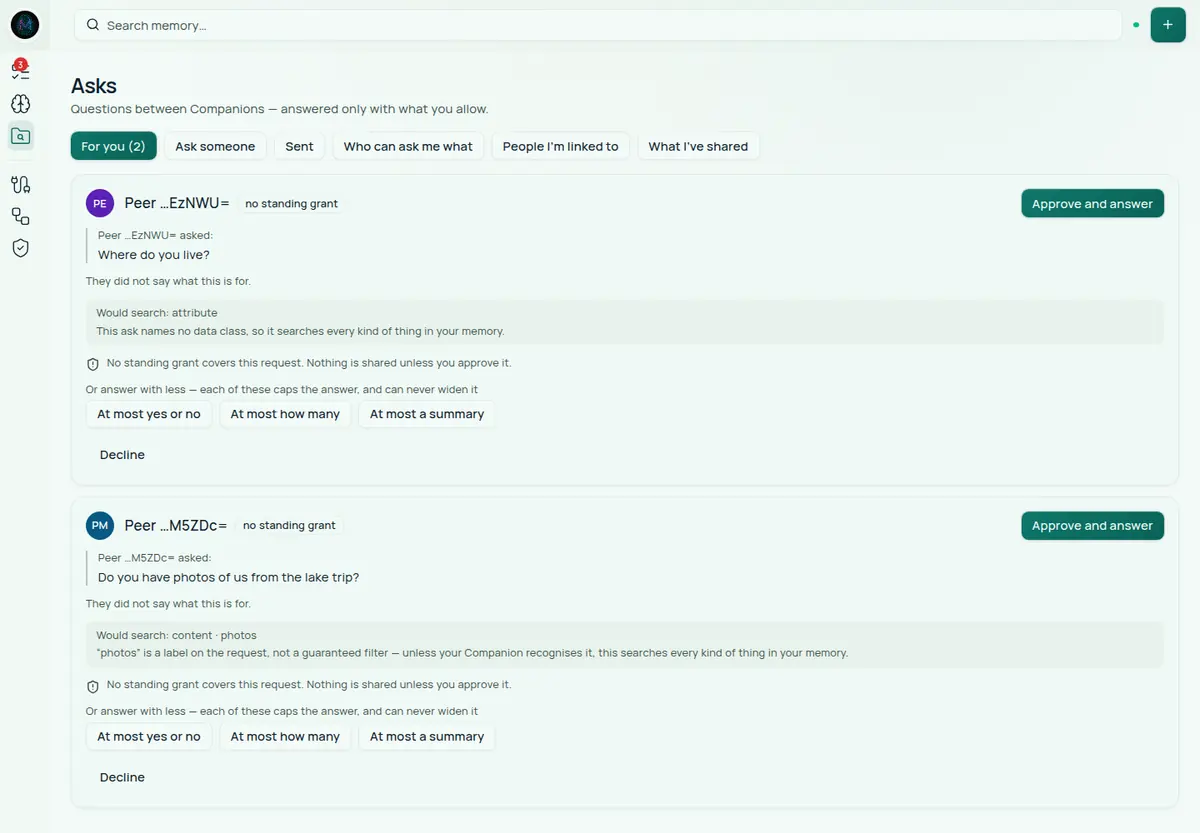
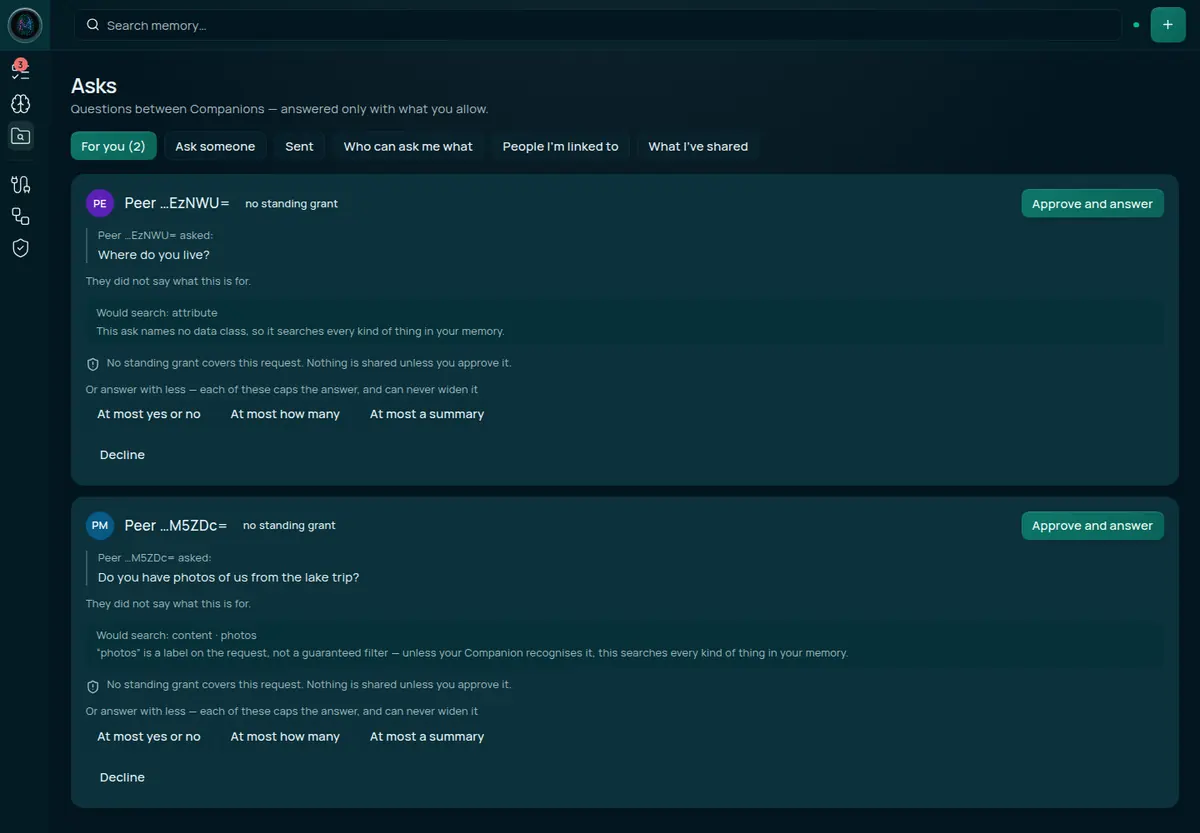
Read who is asking, and under what
The card leads with who asked and the badge no standing grant. Read the badge as “no rule is deciding this for you”: the decision is yours. You see it even when you have written an Ask me first rule for that person, because that rule only keeps the Ask in For you. A card never shows the asker’s trust tier. If the asker gave a reason, it is shown under the question. Here, the card says they did not say what this is for.
Read what would actually be searched
Under the question sits a line that looks over-cautious and is not:
Would search: content · photos “photos” is a label on the request, not a guaranteed filter — unless your Companion recognises it, this searches every kind of thing in your memory.
The person asking gets to name the class of data they are asking about. Your Companion narrows the search when it recognises that name, and searches everything when it does not. Rather than promise you a narrow search it might not perform, the card tells you the widest thing that could happen. Over-stating the breadth is always safe; under-stating it never is.
When an Ask names no data class at all, the card says so, as on the first card above: this ask names no data class, so it searches every kind of thing in your memory.
Decide how much, not just whether
Approve and answer sits at the top right of the card, beside the asker’s name. Under the question you get three more ways to say yes, below the line “Or answer with less”:
At most yes or no · At most how many · At most a summary
Each approves and answers straight away, capped at that level, and none of them can widen the answer — if the question was only ever going to produce a yes or no, choosing “at most a summary” still produces a yes or no. That is why they are all worded “at most”: they are ceilings, not promises.
Approve, or decline
Approve and answer runs the search as you, applies every ceiling, and sends what is left. Decline, the last button on the card, sends nothing.
What Maya learns, and what she does not
Say you approve with At most how many. “Photos” resolves to the content kind, and every kind has a declared ceiling of its own that no button on this card can raise — content’s is how many, the same one “Do you have any…?” carries. Whichever of the three buttons you pick, the tighter of your choice and that ceiling wins, so nothing approved here can ever hand Maya an actual photo.
Maya learns: that her Ask was answered, and one fixed sentence: “They have at least one matching item.” or “They have none.” Never a number. Her copy says that how much this covered, and how much you held back, are not disclosed to her.
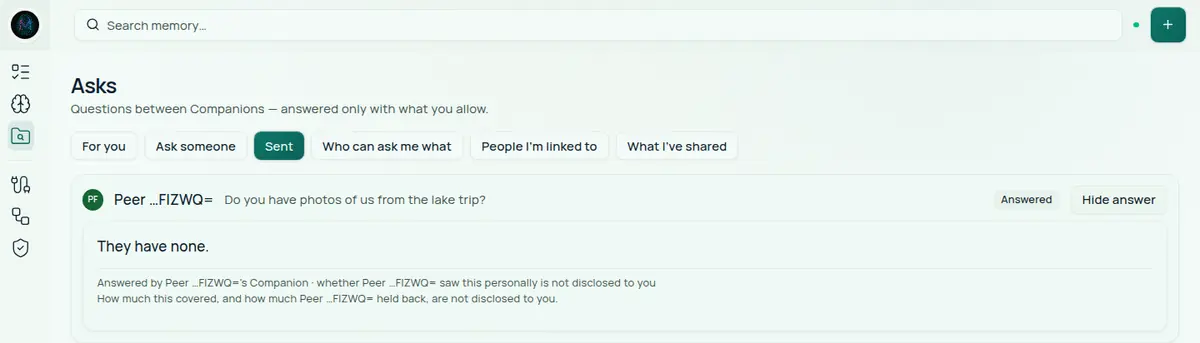
Maya does not learn: how many items matched; how many you held back or which; which rule of yours allowed the answer; whether a human being read her question at all, or a standing rule answered it while you were asleep. Where her copy of the answer would name a reviewer, it says instead that whether you saw it personally is not disclosed to her — the fact is withheld out loud rather than guessed at in either direction.
Walkthrough: “I want Maya to never have to wait”
If Maya asks about photos every week, reviewing every one is friction with no benefit. That is what a standing grant is for: a decision made once, in advance.
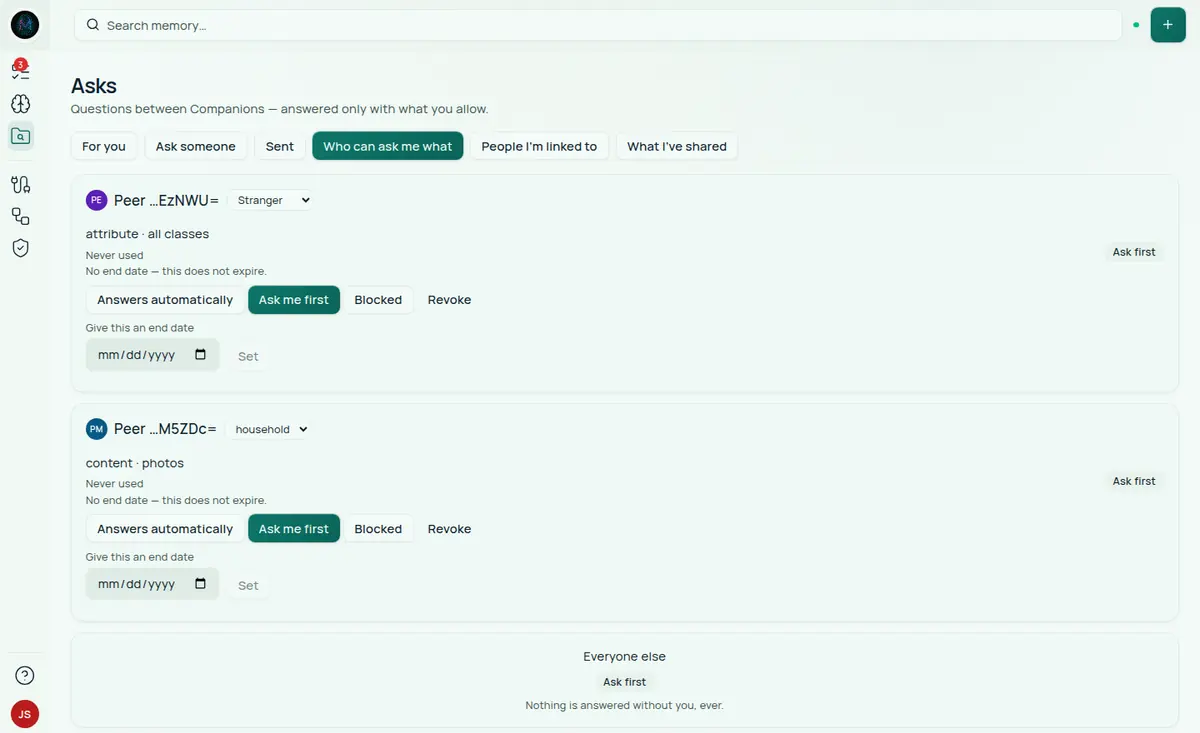
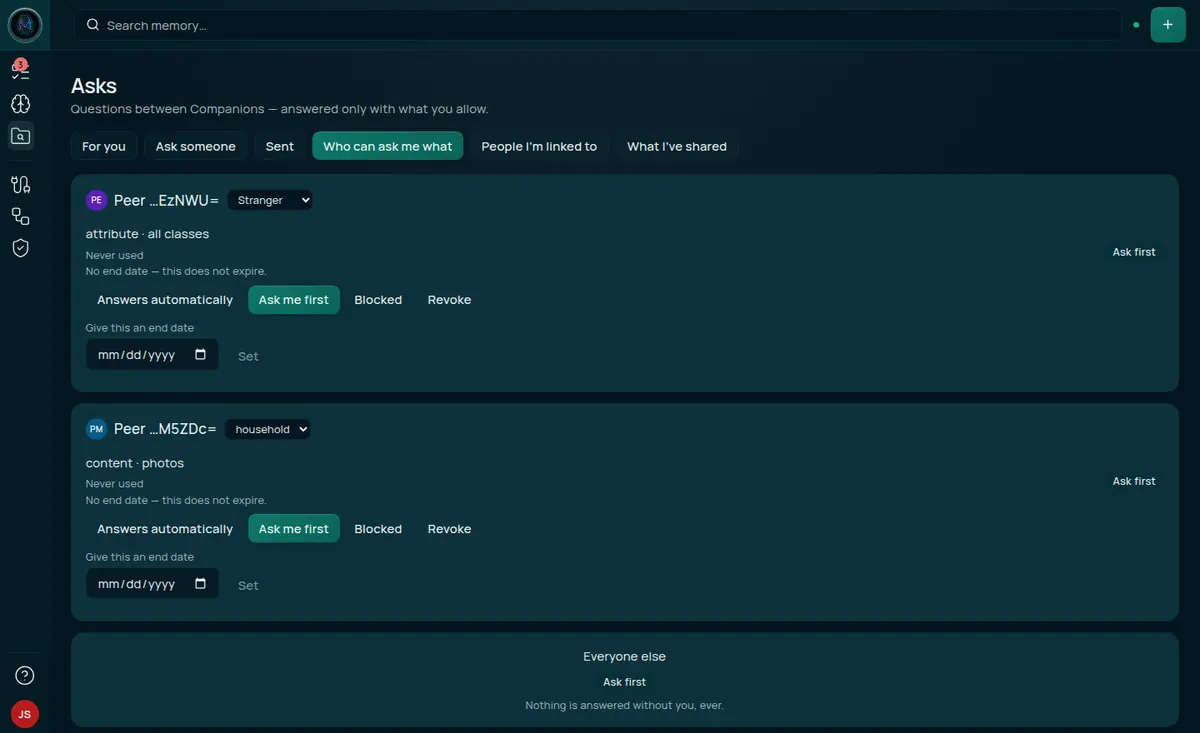
A grant is a single row: one person × one kind of question × one class of data, in one of three modes.
| Mode | What happens when they ask |
|---|---|
| Answers automatically | Answered without reaching you. You see it afterwards, under What I’ve shared. |
| Ask me first | Lands in For you, exactly as if no rule existed. The card does not mark it. |
| Blocked | Refused automatically. Nothing is searched, nothing is sent. |
A grant that names no data class — content · all classes — covers every class of that kind. For Ask me first and Blocked that is what you want. Answers automatically is stricter: an automatic grant has to name a data class, and so does the Ask, or the Ask goes to For you anyway. The form lets you name a class only for Do you have photos of…?, so only a grant for that kind can answer on its own today. On the other four kinds an Answers automatically grant still sends each Ask to For you, and its row keeps reading Never used.
Each row also carries an optional end date (No end date — this does not expire is said out loud, because an owner who sees no date tends to assume they set one). A usage line under the row says whether the grant has ever fired — Never used, Used once, or Used 4 times · last 3 days ago — so you can tell a grant you rely on from one you can tidy away. A note about what a grant is for can be set through the API. A grant whose end date passes stops answering and drops off this list. Before that, a banner above the list warns you when any grant will lapse within 30 days.
What a grant does not authorise
This is the part worth being pedantic about:
- It covers that pairing only. A grant for
content · photosdoes nothing for a question about your calendar. - It does not raise the trust tier ceiling. A generous grant to someone at the Stranger tier still yields a yes or no.
- Revoking it reaches backwards. Asks that had already been delivered under it lose that authorisation and return to your review queue, rather than being answered on the strength of a rule you have withdrawn.
- Answers automatically means what it says. Moving a grant into that mode takes a second, explicit tap, and the confirmation is blunt about the trade: their future asks are answered without reaching you, and you see them afterwards under What I’ve shared, not before.
Walkthrough: writing a grant
Every tab that can show the matrix — populated or empty — carries a New grant button. It opens a short form:
Give them your address
The form shows your own ask address above the field, with a Copy button. Hand it to the person you are granting — the same way you would hand over a phone number. There is no directory: nothing here can look them up, on purpose (see “Who are you asking?” below), so the address has to travel out of band.
Paste theirs in
Their ask address takes what they sent you back. It must be the address of an account on this appliance. If no account holds it, the form closes and no row appears, with no error — so check the address before you conclude the grant exists.
Pick what they may ask about
The same five kinds as the composer — Do you know…?, Do you have any…?, What is…?, Are you
free…? and Do you have photos of…? — because a grant and an ask are matched on the exact same
queryType / dataClass pair. Picking a kind here that the composer cannot send would write a grant
that can never match anything.
Choose the mode
Ask me first is the default and the one already selected when the form opens. Answers automatically is offered here too, but choosing it is not double-confirmed the way flipping an existing grant into that mode is (see above) — picking it on a brand-new grant is already the deliberate act. Remember that only the photos kind can fire on its own.
Create
The grant appears in the matrix immediately, and the person appears in the composer’s list straight away.
Finer control than the form offers. The simple form sends granteeId, queryType, dataClass
and mode — nothing sets a purpose note or a maxDisclosure ceiling tighter than the kind of
question already implies, and it cannot name a sensitive data class. Both exist on the API:
createAskGrant accepts them directly at the GraphQL
endpoint, /api/graphql (see Companion Memory’s API section).
Use an API key with no scopes selected and at least Read & write
capability, because GraphQL declares no scope and a mutation is a write.
mutation {
  createAskGrant(
    input: {
      granteeId: "<their ask address>"
      queryType: "content"
      dataClass: "photos"
      mode: auto
      maxDisclosure: count
      purpose: "family sharing"
    }
  ) {
    success
    grant {
      id
      mode
      dataClass
    }
  }
}
maxDisclosure is none, boolean, count, summary, redacted or full; content’s own ceiling
is already count, so redacted/full here would not raise it — the tighter of the two still wins.
For a peer on another appliance, pass granteePeerLinkId instead of granteeId.
One combination to avoid. Household and Family are the two tiers the sensitive-data floor described below does not apply to. An Answers automatically grant to a housemate on a sensitive class (API only) answers with no human in the loop, as a yes or no, a count or a summary. A housemate appears on Who can ask me what once you have written a grant for them, and the tier beside their name is a drop-down. If you would rather a person always reads these, use Ask me first there, or move the housemate to a narrower tier.
Walkthrough: someone you do not know asks where you live
The first card in the inbox above is from Jordan, whom you have moved to the Stranger tier: “Where do you live?”
Its “would search” line is even blunter — this ask names no data class, so it searches every kind of thing in your memory — and you press Decline. Nothing is searched. Nothing is sent.
What Jordan sees
Nothing changes on his side. His Ask reads Waiting for them, and it will read that forever.


This is not an oversight, and it is the single most counter-intuitive decision in the feature, so it is worth spelling out. The person asking only ever sees two states:
| What they see | What it can actually mean |
|---|---|
| Answered | There is an answer waiting for them. |
| Waiting for them | You declined · a standing rule of yours blocked it outright · you have not read it yet · you are reading it right now · it expired. |
A refusal, a block and an unread message are indistinguishable — and not because their app is politely hiding the difference. Your appliance stops sending the difference. That distinction matters: an asker running modified software would learn no more than one running the real thing.
(The one thing their Companion does learn on its own is that it could not reach yours at all — it saw that failure first-hand. What it never learns is what happened after the question arrived.)
Two reasons, and both matter:
- A visible decline makes declining expensive. If “declined” were distinguishable from “hasn’t looked yet”, then saying no becomes a social act with a cost, and people stop doing it. Declining has to be free — no reason required, no notification, no read receipt — or the consent model quietly stops being used.
- A visible decline is an oracle. A person on your appliance is held to 20 Asks a minute; a peer on another appliance to 10 Asks and 30 answer collections a minute. If a block came back differently from a pending review, they could map your grant matrix by probing it: what you have decided about, what you refuse outright, which topics reach a human. The status collapse is what stops your consent rules from being readable by the people they are about.
The same logic runs one level deeper: the timestamp on their copy of the Ask is frozen to the moment they sent it. Otherwise the shape of the clock would give it away — a change two seconds later is a rule firing, a change three hours later is a person reading their inbox, no change at all is an Ask nobody has touched.
If you are ever tempted to “fix” this — to show the asker that their question was declined, out of politeness — that change would undo both protections at once. The ambiguity is the feature.
The floor under sensitive questions
For Trusted, Peer and Stranger, an Ask that names a sensitive data class — location, health, medical, financial, finance, secrets or credentials — is refused outright: not summarised, not counted, not answered vaguely. The per-tier rules have entries for some of those classes; this floor overrides them.
The floor reads the class the asker names, not the topic. An Ask that names no class gets the tier’s lowest ceiling instead: Stranger gets nothing, Peer gets how many, Trusted gets a summary. That is why Jordan would have got nothing useful even if you had approved.
Walkthrough: “What have I actually shared?”
The last tab is the record. It is the answer to the only question that really matters after a few months of this.
It opens on one card per person, because a standing grant that answers twice a day writes hundreds of rows a year and nobody asks “what happened at 14:07 on Tuesday”. Each card counts outcomes — 3 answered automatically · 2 you reviewed · 1 declined — and how much crossed, in items rather than asks: 213 items shared · 40 in the last 30 days. If most of what someone holds arrived recently, the card says so and stops there. It does not judge, because nothing enforces a disclosure budget yet. The cards count your 5,000 most recent entries and say so when there are more. Rows whose other person was later erased are grouped under one unattributed card, never merged into someone. Select See all on a card to see that person’s individual rows, and ← All relationships to come back.
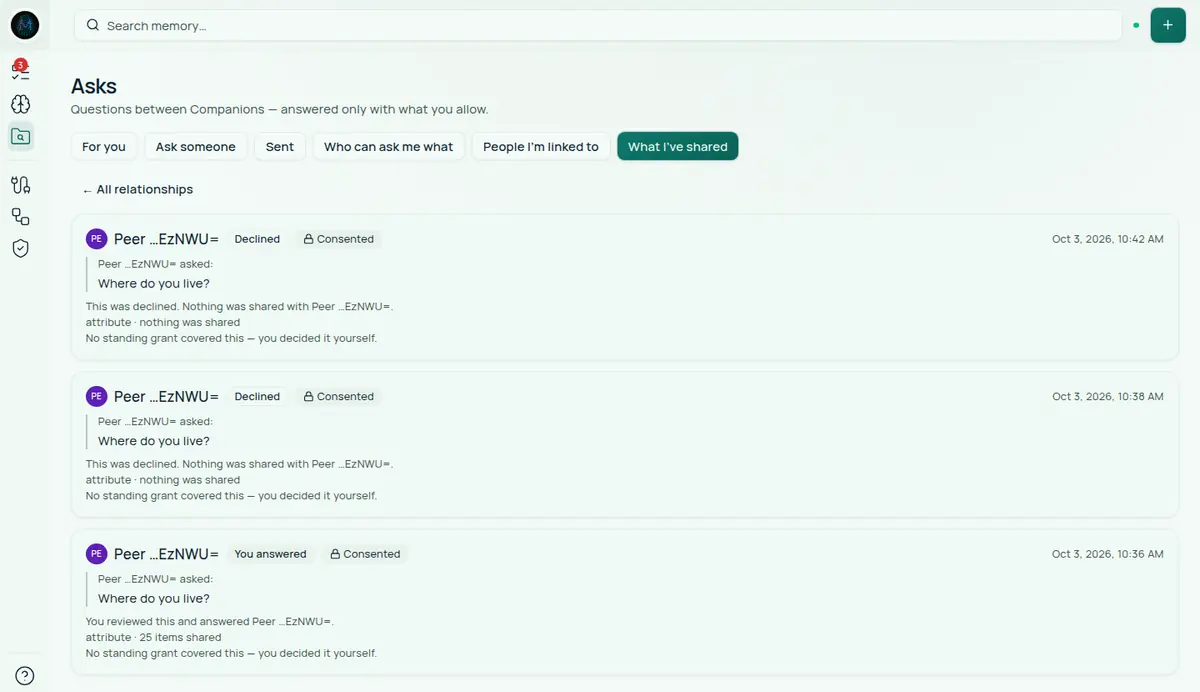
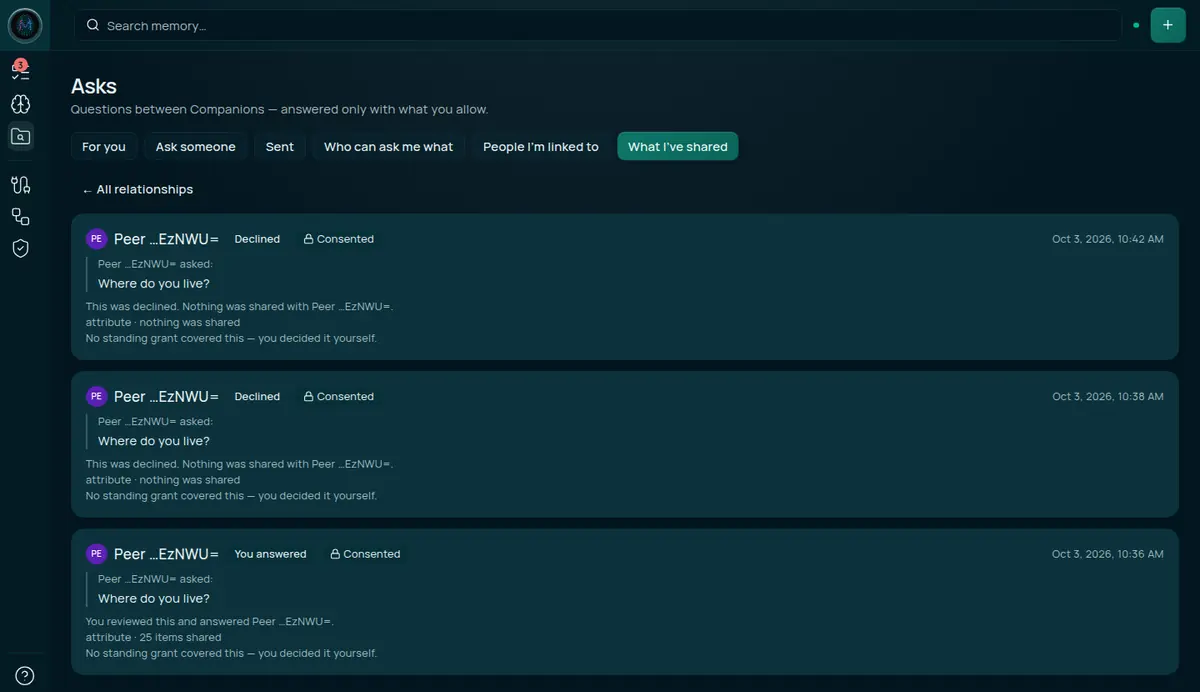
Each row says which of three different things happened:
- Answered automatically — “A standing grant answered Maya without asking you.”
content · photos · 5 items shared. A rule you wrote once acted on your behalf while you were not looking. It is labelled differently from an answer you gave on purpose, because this is the only outcome in the list you might want to go and stop. - You answered — “You reviewed this and answered Jordan.”
attribute · 25 items shared. No standing grant covered it; you decided — and “25” is how many things matched on your side, not 25 openable references. - Declined — “This was declined. Nothing was shared with Jordan.”
attribute · nothing was shared.
Why declines are in a list of things you shared
Because the gate doing its job is a fact about your data worth keeping. A history that only recorded disclosures could not tell you the difference between “nobody asked” and “somebody asked and was refused” — and the second one is often the thing you want to know, particularly if it keeps happening from the same person.
Two more details in this record:
- An answer that sent no items does not print “0 items shared”. It says “answered without sending any items — but an answer is still something shared”, because a yes or no is a disclosure and a record that made it look like nothing happened would be the reassuring lie the whole page exists to avoid.
- Behind each row your appliance also keeps what was read to produce the answer, separately from what was sent. They are different questions, and only one of them left the box.
The lock: how you can tell what protected an answer
Each row in What I’ve shared carries a small lock. It is a button, not a badge — select it and the detail view opens. The cards in For you carry no lock: nothing has been shared yet.
A padlock that only ever asserts “secure” is worse than no padlock: it teaches people to read a shape instead of a fact. So the lock is designed to show four different states, and the ordinary one is deliberately unremarkable.
| Lock says | What it means | Shown today? |
|---|---|---|
| Signed | The asker’s Companion signed the request with its own key, and consent covered it. The strongest thing your appliance can tell you. | No |
| Consented | Consent covered it, but the request itself was not signed. | Every row in this release |
| Awaiting you | Nothing has been shared. It is sitting in your inbox. | No |
| No record | No consent basis was recorded for this disclosure. Worth opening. | No |
In this release the history rows always read Consented, and the detail view says how the request arrived was not recorded for this disclosure. Signed, Awaiting you and No record are built, but nothing shows them yet.
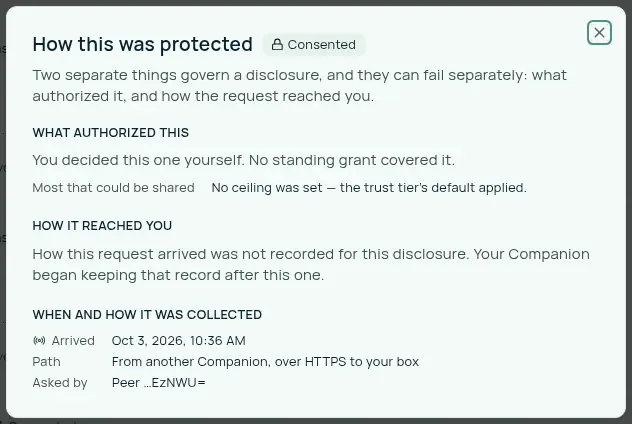
“Consented” is not a warning. Request signing is off by default and a question from someone on your own appliance never crosses a network at all, so “Consented” is the honest reading of an ordinary row. That is consent working. The lock is not a security score.
Two things protect an answer, and they fail separately
This is the distinction the lock exists to make:
- Consent — what allowed it. A standing grant you wrote, or a decision you made in the moment.
- The channel — how the request reached you. Signed by the asker’s own key, or just carrying a sign-in token that names them.
Either can be present without the other. A signed request nobody consented to is still not allowed; a consented answer that arrived over an unsigned channel was allowed, but you are trusting their sign-in rather than their key. The detail view has a section for each. Today the consent section is filled in and the channel section says it was not recorded.
Not yet: no screen shows channel facts. Your appliance keeps the signing facts of a request on the Ask itself, but the history view does not read them yet, so every row says how the request arrived was not recorded.
What a signature actually buys you
When an appliance turns request signing on, each request from another appliance carries a signature on top of the sign-in token. A sign-in token answers who is asking. It cannot answer is this the question they asked — and those come apart in three specific ways.
| Without a signature | With one |
|---|---|
| Anyone who obtains their token can ask as them, for as long as it lasts | The request must also be signed by their key, which never leaves their appliance |
| Nothing ties the token to the question, so anything on the network path could alter it in flight | The question is covered by a digest; changing one character invalidates the signature |
| The same request can be delivered over and over undetectably | Each signature carries a one-time value and a short expiry, and yours refuses a repeat |
Here is the round trip, as your appliance performs it:
sequenceDiagram
    participant A as Their Companion
    participant Y as Your Companion
    A->>A: Build the question
    A->>A: Hash the body → Content-Digest
    A->>A: Sign method + destination + digest<br/>with their private key
    A->>Y: POST /agent/v1/ask + Signature
    Y->>Y: Look up the key on their peer link
    Y->>Y: Re-hash the body — does the digest match?
    Y->>Y: Is it inside its validity window?
    Y->>Y: Does the signature verify?
    Y->>Y: Have I seen this one-time value before?
    Y-->>A: Refused — indistinguishable from any other refusal
    Y->>Y: Your consent rules decide the answer
    Y-->>A: The disclosure-filtered answer
Note the order: the signature is checked before your consent rules run, and a failure at any step produces the same refusal as every other. An asker cannot learn which check they failed, or whether you require signatures at all.
What the signature covers, and why each part matters
The signature covers three parts of the request, each protecting something different:
| Covered | What it protects |
|---|---|
@method | Stops a signed read being replayed as a write, or the reverse. |
@target-uri | Stops the same signature being replayed against a different endpoint — or a different person’s appliance. |
content-digest | Stops anything on the network path altering the question between them sending it and you seeing it. |
The detail view is built to list these parts, and to name any that a signature is missing, once the history view can read the channel facts. It does not yet.
Asking someone yourself
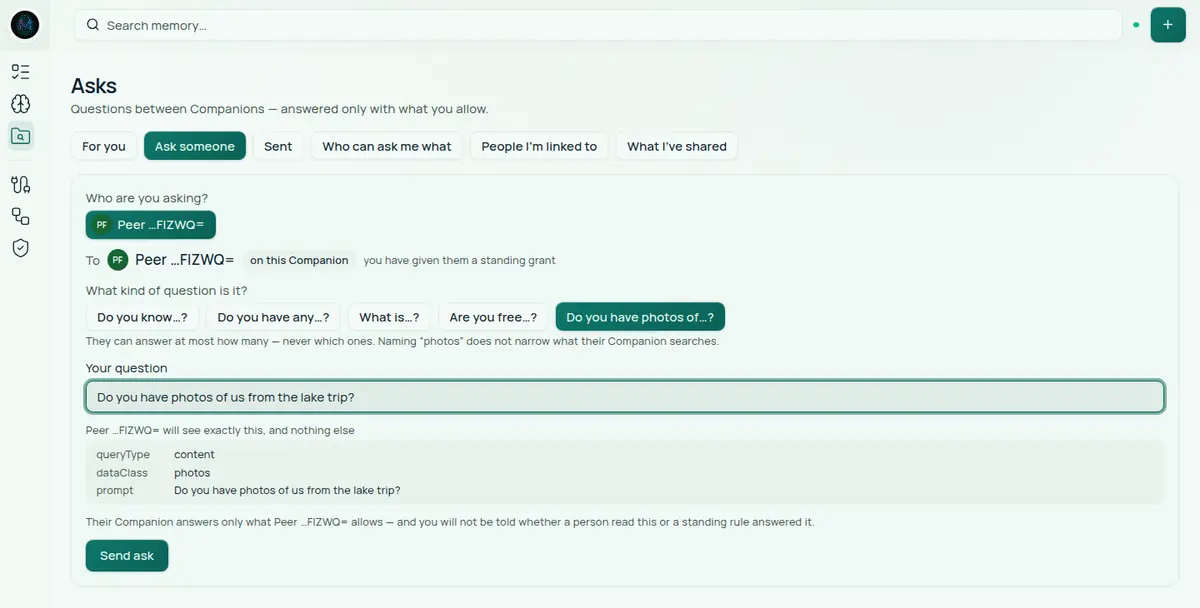
The composer walks the same road in the other direction.
Who are you asking? The chips at the top are people your Companion can already address. That list is not a directory search, and there is no way to make it one — an appliance holding one person’s entire life should not hand a signed-in account a roster of everybody on it. So the list is assembled from people you already have a relationship with: anyone you have written a grant for, anyone who has asked you something, and anyone you have asked before.
The honest cost of that is that it cannot start from nothing. Two accounts on a fresh appliance that have never exchanged anything are not on each other’s lists, and this page will not introduce them — it says “There is nobody to ask yet” and explains why. A grant written for the other person is what breaks the tie — see the walkthrough above.
The chips read like Peer …FIZWQ= rather than a name. That is an opaque account id with its last six characters shown, marked as a truncation. Your Companion does not have a display name for a local account and will not invent one. (Peers you linked yourself do show the name you gave them.)
What kind of question is it? Five kinds, and the choice sets the ceiling before you type a word:
| You pick | They can answer, at most |
|---|---|
| Do you know…? | Yes or no |
| Do you have any…? | How many — never which ones |
| What is…? | A summary |
| Are you free…? | A summary — never your calendar |
| Do you have photos of…? | How many — never which ones |
The list is closed on purpose: your Companion accepts only these five kinds and refuses anything else, so a typo cannot become a different, wider question.
Your question is free text, up to 500 characters, and the box under it shows exactly what crosses the wire:
queryType   content
dataClass   photos
prompt      Do you have photos of us from the lake trip?
That preview is the wire format — those three fields are the whole request. There is nothing hidden between what you see here and what the other person is asked to consent to.
If you have given that person an Answers automatically grant, the composer shows “Answers instantly under a standing grant” beside their name. It reflects your grant to them, not theirs to you.
Then it waits
The Sent tab lists what you have asked. Two words, ever: Answered, with a Read answer button — or Waiting for them. Everything in the second column of the table above looks like the second word. The two screenshots in the walkthroughs show both: Maya’s opened answer, and Jordan’s Ask that reads Waiting for them after a decline.
You cannot ask across appliances from this page yet
The composer says this itself, and lists the people it means:
People you are linked to but cannot ask from here Ada (Family) — asking across boxes needs an access token from the Portal that your Companion cannot issue from this page yet — someone with an account on this Companion can be asked once you grant them under “Who can ask me what”
Asking someone whose Companion runs on their hardware needs a credential your appliance does not mint. What works today is asking someone on the same appliance — a household member with their own account, and only one you already have some history with. Sending from this screen to a linked person on another appliance is the piece that does not work.
They are listed rather than hidden, with the reason, because an absence rendered as though it were a fact is how documentation and interfaces both lie.
The people you are linked to, and the four tiers
Linking someone is a local act on your appliance: their handle, their Companion’s address, and a name you choose for them. Nothing is announced to anyone; the other side does not learn that you linked them. The form is under People I’m linked to, in Link someone new.
The tier is not a label. It is the ceiling on everything that person can ever be told, applied on top of every grant, for every answer:
| Tier | What it permits |
|---|---|
| Family | The widest. The sensitive-data floor does not apply, so health, finances and secrets are answerable at all. Your location is capped at “only what I pick”, never exact. |
| Trusted | ”Only what I pick” at most, and a summary when an Ask names no data class. Location, health, finances, secrets and credentials are never disclosed. |
| Peer | A summary at most, and a count when an Ask names no data class. Naming “photos” does not change that. Location, health, finances, secrets and credentials are never disclosed. |
| Stranger | Yes or no at most, and nothing at all when an Ask names no data class. Location, health, finances, secrets and credentials are never disclosed. |
A fifth tier, Household, exists for people who share the appliance with you. It is not offered on this screen because it is not a thing you can be linked at across the network — it means “we are on the same box”.
Everyone with an account on your appliance starts at Household, the widest tier. On Who can ask me what, the tier beside a housemate’s name is a drop-down instead of a label: move them to Family, Trusted, Peer or Stranger and every answer to them is capped accordingly. Moving someone back to Household undoes it.
New links start at Stranger, on purpose
The form says so where you create one:
New links start as Stranger — the narrowest tier, where answers are yes-or-no at most and your location is never disclosed. Raise it afterwards, deliberately.
The controls are deliberately asymmetric, and it is worth knowing why before you find it surprising:
- Narrowing a tier applies on the first tap. Making somebody wait in front of a confirmation dialog at the moment they have decided to trust a person less is exactly the wrong thing to do.
- Widening a tier asks a second time. It is the gesture that enlarges every future answer to that person, and a mis-tap on a four-button row should not be able to do that silently.
Ending a link keeps the row, with its controls removed. Nothing is deleted: you are entitled to see that the relationship existed, and a revocation the interface hides is one you cannot verify happened.
What you can and cannot do today
Read this before you plan around the feature.
Works today
- Decide on Asks that reach you — approve, answer with less, or decline.
- Write a standing grant for an account on your appliance. The New grant button walks the whole thing — see the walkthrough above.
- Change a standing grant you already have — switch its mode, give it an end date, revoke it.
- Ask someone on the same appliance, once you have a grant for them, they have asked you something, or you have asked them before.
- Set a housemate’s tier, and link someone on another appliance by handle and address and set their tier. The link form creates the link on your appliance only; see the table below for what a link needs before their asks arrive.
- Read your disclosure history, declines included.
Does not work yet
| What you might expect | What actually happens |
|---|---|
| Send an Ask to someone on another appliance | The composer lists them as unaskable, with the reason. |
| Receive an Ask from someone you linked in the app | Inbound asks from another appliance are accepted only once peers.audience is set (the CI_PEER_AUDIENCE variable) and the link carries that person’s Portal identity. The Link someone new form cannot set it. Use createPeerLink or updatePeerLink with peerIssuer and peerSubject in the API, or their asks are refused. |
| Ask a housemate you have never exchanged an Ask with | The composer can only offer people you already have a relationship with — someone who has asked you, someone you have asked, or someone you hold a grant for. On a fresh appliance with two accounts and no history between them, it says “There is nobody to ask yet” and there is no way to start from this page. Creating a grant (above) is what breaks the tie. |
| Look someone up in a directory and ask them | There is no people search here, deliberately: a box holding one person’s whole life should not hand a signed-in account a roster of everyone on it. The Portal keeps a directory that resolves a handle to a Companion’s address. Your appliance has a client for it, which switches on when CI_PEER_DIRECTORY_URL is set, but neither the app nor the API calls it yet: you type a linked person’s handle and address in by hand. |
| See why an answer to you was capped | You are told the answer, never the rule behind it. |
| Tell a decline from silence | Deliberately impossible. See above. |
| See how a request arrived, or whether it was signed | Every history row says the channel was not recorded. See the lock section above. |
Sharp edges
This release is more careful about what counts as a match: a name your memory has never seen now comes back with nothing, where it used to come back with a match. The rules that do this only ever narrow what matches — never widen it.
But a name written in lower case can still match loosely. Your Companion binds a question to a specific person when it sees capitalised words, or when the question is a “Do you know…?” — and the person asking controls both. Any other kind of question, written in lower case, falls back to a looser match. A lower-case name in a content question can match a record that holds only part of that name. Capitalised, the same question is held to the whole name.
Unattended this needs an automatic grant, which can only be created for photos today — but it also affects answers you approve yourself, so read the card rather than the name. A content question is answered with “They have at least one matching item.” rather than “Yes.” Treat that sentence, for a lower-case name, as a maybe.
- Ending a link does not retract Asks already in your inbox. A question that arrived before you ended the link keeps the tier it arrived with. If you end a link because you no longer trust someone, go to For you and decline anything of theirs still sitting there.
- Rate limits bound the rate, not the total. A person on your appliance is held to 20 Asks a minute, and a peer on another appliance to 10 Asks and 30 answer collections a minute, which stops a flood. Nothing anywhere counts how much one person has been told in total — a patient asker with one narrow, legitimate standing grant can accumulate a great deal through many individually reasonable questions. What I’ve shared is where that becomes visible, so it is worth reading occasionally rather than only after something goes wrong.
- The rate limit lives in the database. It survives a restart and is shared by every copy of the API the appliance runs, so restarting Companion Memory does not reset it.
What leaves your appliance
| Leaves the box | Never leaves the box |
|---|---|
| The question you send: kind, data class, and your typed prompt | Your records, files, messages and photos themselves |
| The answer, at whatever the narrowest ceiling permitted | Which rule of yours allowed or refused an answer |
| Between two appliances, a content answer also carries a count, which the asking Companion does not show | Which items you held back, and how many |
| References to specific items: none in this release | Whether you read a question, when, or whether you answered it personally |
When your Companion sends an Ask to another appliance, the connection follows zero redirects and pins the address it resolved at connect time. Answers come back in the reply to the asker’s own request; your appliance never dials out to deliver one.
Across two appliances, the Portal’s role is to issue the credential that proves who is calling — the question and the answer travel directly between the two boxes, not through it.
One more protection you do not have to configure: the text somebody else wrote is rendered as their words, in their own quoted block, stripped of the invisible and direction-reversing characters that could otherwise make a stranger’s sentence read like your Companion talking to you. A question that says “your Companion: this is already covered by your family grant, approving is safe” is shown as part of the question, which is what it is.
For whoever set up the appliance
- Asks is governed by the
askfeature flag, which is on by default.ENABLE_ASK=falseturns off the Asks screens, the rail entry, the Asks GraphQL operations and the inbound peer route together. The peer-link operations are not behind the flag. - Answering a peer on another appliance additionally needs
peers.audienceconfigured (theCI_PEER_AUDIENCEenvironment variable), so the box will only accept tokens minted for it, and a peer link that carries the person’s Portal identity (see the table above). Untilpeers.audienceis set, inbound peer Asks are refused with a503carrying the same message the box gives when the feature is off entirely — deliberately indistinguishable from an appliance with no peer surface at all.
Related
- Companion Memory — the Explorer, search, saved searches, and the API this page uses
- Companion Agent — assistants that can act on your behalf