⌚ Pebble
Recall and search your Companion Memory from your wrist. The watch asks your phone, your phone asks your Companion Memory, and the answer comes back with a short buzz.
The site previews the setup steps and the roadmap. The app is still a developer preview, and you can’t install it yet.
Overview
Companion Memory for Pebble is a Pebble watchapp with a phone companion. It is not a Companion Hub app, and it doesn’t use Rebble or the Pebble app as anything other than the way your watch talks to your phone. The watch never touches the network. It sends a small request over Bluetooth to the companion running in the Pebble phone app, and the companion makes one authenticated HTTPS call to the Companion Memory address you enter.
Status: developer preview. You can’t install it yet. It has no public download or store listing, and its source repository is private, so you can build it only if Companion Intelligence gives you access. To ask about access or follow progress, join the Discord . The app is version 1.0, it isn’t in the Rebble App Store, and today you build it from source with the Pebble SDK or CloudPebble.
The app reads from your Companion Memory. It doesn’t receive Hub alerts, run Hub automations, control Omi, or push items into the Pebble timeline. Those ideas are on the roadmap, not in the app.
Key features
- Recall — the latest from your Companion Memory in one press.
- Ask — pick a question from a list, or speak your own on watches with a microphone. Companion Memory searches what you saved and returns the lines that match. The answer is a search result, not a generated reply.
- Last answer — your most recent answer stays on the watch, so it is there offline.
- Connection check — after you save settings, the phone companion tells you what works: Recall and Ask, watch registration, and location sync.
- Location sync — optional and off by default. When you turn it on, the phone sends one location sample to your Companion Memory every 15 minutes.
An answer buzzes the watch and appears as short lines, fitted to 252 characters. Errors state a fact and a fix, for example “Key rejected. Paste it again in settings.”
Supported hardware
The watchapp targets all five Pebble platforms.
| Platform | Watches | Speak (dictation) |
|---|---|---|
| Aplite | Pebble Classic and Steel | No microphone. Pick a listed question. |
| Basalt | Pebble Time and Time Steel | Yes |
| Chalk | Pebble Time Round | Yes |
| Diorite | Pebble 2 | Yes |
| Emery | Pebble Time 2 | Yes |
You also need the Pebble phone app for your watch. If you use Rebble for your watch’s services, follow the Rebble setup guide first.
How it works
flowchart LR
    W["Pebble watch<br/>Recall · Ask · Last answer"] <-->|"Bluetooth<br/>AppMessage"| P["Phone companion<br/>in the Pebble app"]
    P <-->|"HTTPS<br/>x-api-key"| S["Companion Memory"]
Recall and Ask are the same call to Companion Memory (POST /api/memory/recall) with a different query. The companion pulls the memory lines out of the result, tidies dates, and fits them to the watch.
Setup
You need a running Companion Memory that your phone can reach over HTTPS. On iOS, an http:// address is refused.
Create a Companion Memory API key
In Companion Memory, open Settings → API Keys and create a key with the memory scope. See Get your API keys. To check the key from a terminal:
curl -X POST https://your-memory.example/api/memory/recall \
  -H "x-api-key: YOUR_KEY" -H "Content-Type: application/json" \
  -d '{"query": "what happened recently?", "maxResults": 3}'
Build the watchapp
In CloudPebble , import the watchapp’s source repository (you need access to it) and select Compile. To build locally instead, install the Pebble SDK and build from the source folder:
uv tool install pebble-tool
pebble sdk install latest
npm run build
Install it on your watch
Send the build to your watch from CloudPebble. To try it in the emulator first, run pebble install --emulator basalt.
Connect your Companion Memory
In the Pebble phone app, open the settings for Companion Memory and, under Connect your Memory, enter your Memory URL and API key. Save. The companion checks the connection and lists what works. Without a saved URL, it tries a default local address that most setups don’t have, so always enter your own.
What each feature needs from the key
Companion Memory denies a scope-limited key on any route that doesn’t name its scope. That decides what a key can do today:
| Feature | Key it needs |
|---|---|
| Recall, Ask | Scope memory |
| Register this watch as a device | Unrestricted key |
| Location sync | Unrestricted key |
With a memory-scoped key, Recall and Ask work, and the settings page reports that registration and location sync need an unrestricted key.
Usage
The main menu has three rows: Recall (“Latest from Memory”), Ask (“Search your Memory”), and Last answer (“Saved on this watch”). Select a row with the buttons.
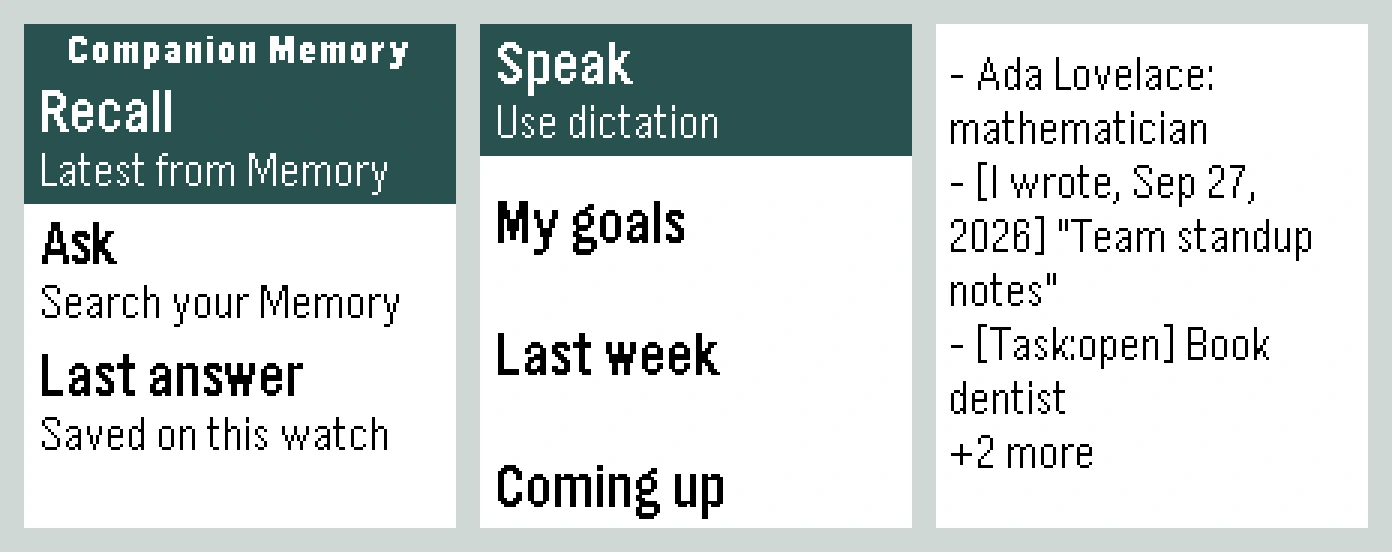
- Recall — asks your Companion Memory to summarize what happened recently and anything you should know about right now, then shows the answer.
- Ask — opens a list of questions: My goals, Last week, Coming up, and Recent activity. On watches with a microphone, a Speak row (“Use dictation”) lets you ask your own question.
- Last answer — shows the most recent answer again without asking your phone. If you haven’t asked anything yet, the watch says “Nothing saved yet. Run Recall first.”
Speaking a question uses Pebble Dictation, which is a cloud speech service. The audio goes to the speech service your Pebble platform uses, not to this app and not to your Companion Memory. Picking a listed question sends no audio anywhere.
Privacy
- Requests go from your phone straight to the Memory URL you enter. There is no relay, no account, and no analytics.
- The API key stays on your phone.
- Location sync is off until you turn it on, and it only ever goes to your Companion Memory.
Troubleshooting
| You see | Do this |
|---|---|
| ”Key rejected. Paste it again in settings.” | The key is missing, mistyped, or revoked. Create a new one and paste it whole. |
| ”Key can’t do that. Give it the memory scope.” | Recreate the key with the memory scope. |
| ”Can’t reach your Memory.” | Check the Memory URL. On iOS it must be HTTPS. |
| ”Nothing found. Try a broader question.” | Your Companion Memory had no match. This isn’t an error. |
| Settings say registration or location “needs an unrestricted key” | Expected with a memory-scoped key. Recall and Ask still work. |
| No Speak row | Your watch has no microphone (Pebble Classic and Steel). Pick a listed question. |
| The watch says “Phone unreachable” | Open the Pebble phone app and check the Bluetooth link. |
Roadmap
The repository’s roadmap plans a recorder (speak a note and save it to Companion Memory), a planner (today’s tasks and adding tasks by voice), and reminders on the wrist. None of these are in v1.0.