Hub Pool
If you own more than one Companion appliance, one of them is usually idle while the other does all the work. Hub Pool puts them in the same pool: an app on one Hub can be served by whichever paired Hub has the model it asked for and the shortest queue, and neither box needs to be reconfigured app by app.
Pooling runs entirely over Tailscale. There is no second network to set up and no ports to open on your router. The pairing steps below are the only setup, and Pool two Hubs walks through them and ends with a test that proves it worked.
Where this stands. This page was checked against Companion Hub 0.3.0. Hub Pool itself ships in 0.2.65 and later, so a Hub on an older build will not have it, and a few things below need 0.3.0 (the text says which). Update every Hub you want to pool. A few advanced placement settings are off by default; they are listed under Limits today.
What pooling gives you
- A second machine’s worth of concurrent requests. While one Hub is answering, the other can answer too.
- Access to models you only pulled once. A model that lives on one Hub becomes usable from apps on the other, and it shows up in the model list those apps read.
- Somewhere to go when a node is busy or stops answering. Requests go to the least busy node that has the model. If a node refuses, fails, or answers with broken output before the reply has started, the request is tried on the next one.
Nothing about your apps changes. They keep asking for the same models over the same OpenAI-compatible API — the Hub changes where that request lands.
How a request is placed
There is no leader in a pool. Each Hub keeps its own engines and its own models. When a request arrives, the Hub ranks the engines that hold the model — its own and its connected peers’ — mainly by how many requests each is already handling. It gives itself a head start of one queued request, because a follow-up message in a conversation reuses the prompt cache that the previous turn left on this node. So work leaves your Hub only when a peer is at least that much emptier, or when the local engines cannot serve the model. The peer answers from its own engines and never relays the request further:
flowchart LR
    subgraph A["Hub A"]
        direction TB
        APPA["AI apps on Hub A<br/>CI_LLM_BASE_URL → pool proxy"] -->|"OpenAI-compatible request"| HA["Hub A<br/>ranks its engines and peers"]
        HA --> EA["Hub A's engines<br/>the models pulled here"]
    end
    subgraph B["Hub B"]
        direction TB
        APPB["AI apps on Hub B<br/>CI_LLM_BASE_URL → pool proxy"] -->|"OpenAI-compatible request"| HB["Hub B<br/>ranks its engines and peers"]
        HB --> EB["Hub B's engines<br/>the models pulled here"]
    end
    A <-->|"a request that goes to the peer: one hop over the tailnet, never relayed onward"| B
    A <-.->|"health probe every 30 s, requests signed with each Hub's own key"| B
Three automatic adjustments sit on top of that order. You cannot tune them from the dashboard, and each only reorders: a node is moved back, never ruled out.
- Large prompts follow measured speed. For a prompt of roughly 6,000 tokens or more (the Hub estimates tokens as a quarter of the request’s size in bytes), a node the Hub has timed on prompts that size is tried before an equally busy one it has not. A node predicted to answer at least three times and 20 seconds faster than the first choice, and no busier, goes ahead of it.
- A busy local engine gives up its head start. If your own engine is working on a different model, or the same model at a different context size, a peer that is no busier goes first.
- A node that answers badly is tried last for a while. Two answers within five minutes that end without their final frame, or that are nothing but
<unusedN>placeholders, move that engine behind the others for that model — for a minute at first, and up to 15 minutes if it keeps failing. One clean answer ends it.
A request waits up to five minutes for a node’s first reply (longer for a very large prompt) before moving on, and an ordinary client error such as a malformed request goes straight back to the app instead of being tried everywhere.
What pooling does not do
This is the part worth reading before you plan around it. Pooling adds capacity in whole requests. Everything below follows from that one sentence.
| You might hope for | What actually happens |
|---|---|
| Two GPUs acting as one | No. One request runs start to finish on one node. There is no VRAM pooling and no model parallelism across machines. |
| A single answer arriving twice as fast | No. Two Hubs serve two requests at once; they do not split one request in half. |
| Running a model larger than either box can hold | No. The largest model you can run is still the largest model a single node can run. |
| Models copying themselves to the other Hub | No. Each node serves what it has pulled. Pulling a model stays a node-local action, on purpose — see below. |
| A different model being chosen once you pair | Sometimes. Once a peer is connected, an app that asks for auto, or that the Hub hands a chat model to, chooses from every model the pool serves. The chat model selected in Settings → AI on the Hub that gets the request wins, wherever it is served. |
| Chaining a request through a third Hub | No. A request goes from your Hub to one peer, and that peer serves it from its own engines. It is never relayed onward. |
| Prompts staying on one machine | No. A request sent to a peer is read by that Hub’s engine. Pair only Hubs you control. The Recent routing list keeps who served what, never the prompt or the answer. |
Model management is deliberately left out of the pool. If pulling a model could happen on “whichever machine answered”, you would end up with copies you never asked for on disks you were not thinking about, and no way to tell which box holds what.
Before you start
- Two or more Hubs, each set up and running, on the same tailnet. Both must be members of it, and each needs Tailscale connected — Tailscale Private Networking covers the path. A Hub whose Tailscale is not connected cannot be reached by a peer and cannot reach one.
- HTTPS Certificates and MagicDNS enabled on the tailnet. Hubs dial each other at
https://<device>.<tailnet>.ts.net, with no plain-HTTP fallback. You enable both once in the Tailscale admin console (see Accessing apps over Private VPN). - Each Hub published at that name. A Hub publishes itself at
https://<device>.<tailnet>.ts.net/with Tailscale Serve, and pairing, approval, and every health check go to that address. On a Linux host Tailscale accepts that change only from root or its operator account, so one command has to be run once on the host (Option 2: host installation). If it is missing, Settings → Network shows Tailscale refused the Hub’s changes with the exact command, which names the host account the Hub runs as. Copy that one rather than typing--operator=$USER, which can name the wrong account. - A check you can run.
cihub pool doctoris read-only. Section C reports whether the Hub is connected and named on the tailnet and whether Tailscale Serve publishes it. It reads the host’s Tailscale, so a Hub that uses the sidecar container reports those checks as unknown. Its fix line says--operator=$USER, which is right only when you are logged in to the host as the account the Hub runs as; otherwise use the command on the card. - Access to the dashboard on both Hubs. Pairing takes a deliberate action on each side, so you need to be able to sign in to both — unless you use the CLI.
- Optional: a Tailscale API credential, if you want one Hub to list every device on your tailnet. Pairing and routing work without it.
How Hubs find each other
Discoverable devices answers one question: which unpaired Hubs can this Hub name? It builds the list from up to three sources, then probes each candidate to confirm it is a Companion Hub. Your laptop and your phone never appear.
| Source | What it needs | What it names |
|---|---|---|
| This Hub’s own Tailscale daemon | Tailscale connected on this Hub. No credential | Every tailnet peer that daemon can see |
| The Tailscale API | An OAuth client with the devices:core:read scope, set in the Hub’s .env | Every device on the tailnet, including ones the local daemon does not list |
| Your CI Account | This Hub is paired with your CI Account, and the other Hub has reported its Tailscale name when it checked in (about once an hour) | Other Hubs in the same organization |
A Hub that none of these names can still be paired with from the command line, by address and a PIN — see Pair from the command line.
Hub 0.3.0 adds a fourth, opt-in source. With Discover Hubs on the LAN (mDNS) switched on under Controls, the Hub also lists Hubs it hears announcing themselves on the local network. Those rows are marked Unverified and have no Pair button, because anything on the network can send such an announcement. It is off by default, and it reaches other machines only when the Hub runs on host networking, which the default install does not use.
Add the Tailscale API credential (optional)
Create an OAuth client
In the Tailscale admin console , create an OAuth client with the devices:core:read scope. Read access to the device list is all the Hub asks for — it never writes to your tailnet.
Add it to the Hub’s .env
TAILSCALE_OAUTH_CLIENT_ID=...
TAILSCALE_OAUTH_CLIENT_SECRET=...
Restart the stack so the Hub picks them up (see Environment variables). The desktop app rewrites the .env file on every launch and keeps only the values it manages, so these lines last only on a Hub you start with cihub up. A desktop-managed Hub cannot keep them, which is why the list of whole-tailnet devices is optional. See Custom environment variables.
You only need this on one Hub, and only to list the whole tailnet. A Hub without it can still be paired with, still serves pooled requests, and still shows you incoming pairing requests to approve. Its Hub Pool section says it cannot list your whole tailnet at once and names the two variables.
Pair two Hubs
Confirm Tailscale on both Hubs
On each Hub, open Settings → Network and check that Private VPN (Tailscale) shows Active with a Tailscale IP (100.x.y.z). If either side is not connected, stop here — pooling has no other path between the two machines.
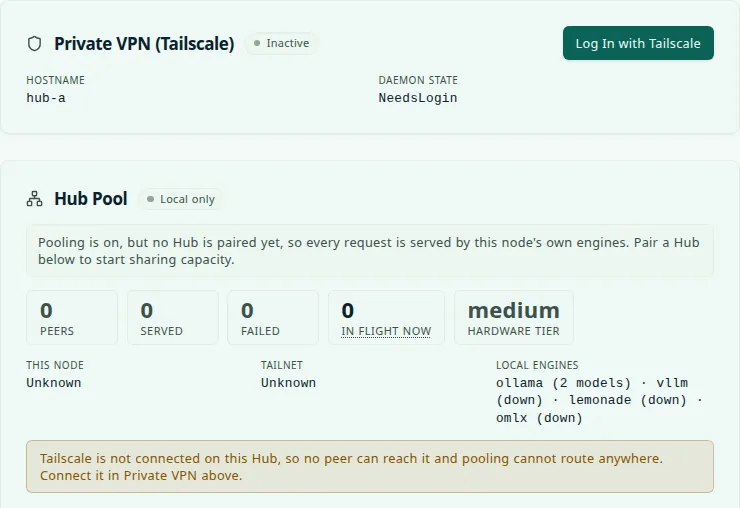
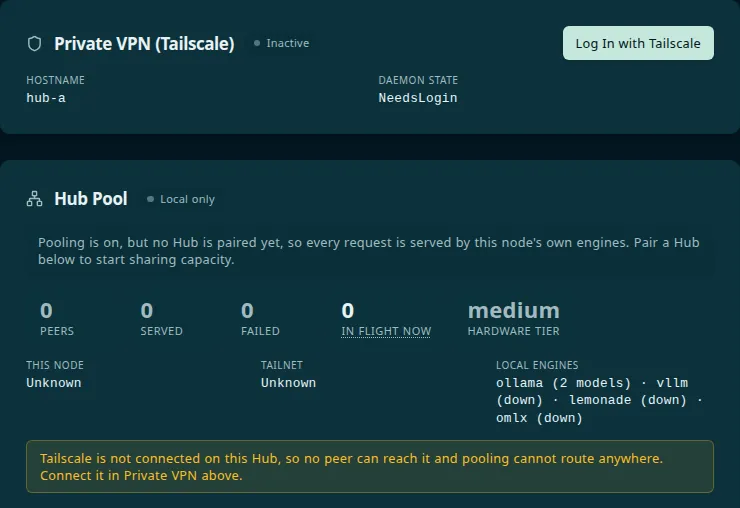
Open Hub Pool
On the Hub you want to pair from, go to Settings → Network → Hub Pool. Discoverable devices lists the Companion Hubs this Hub can name that are not paired with it yet. Each row shows the Hub’s device name, and its full tailnet name appears when you hover.
Optional: mint a pairing PIN on the other Hub
A PIN proves that you are in front of the other Hub’s screen. On the other Hub, open Settings → Network → Hub Pool → Pairing PIN and select Generate PIN. The six digits appear once, work for ten minutes, and can be used one time. Five wrong guesses destroy the PIN, and generating another replaces the first. Hub 0.3.0 has no countdown and leaves the digits on screen until you select Cancel PIN or reload, so note when you made it.
Without a PIN, pairing still works. The request then reaches the other Hub with only a name attached, so approve names you recognise.
Send the request
If you made a PIN, type all six digits into the PIN from the other Hub (optional) box in this Hub’s Pairing PIN block. In Hub 0.3.0 a PIN with fewer than six digits is silently left out, and the request goes without one. Then select Pair next to the other Hub under Discoverable devices. The request moves to Pending requests, showing Waiting for the other Hub to approve. Select Cancel request to withdraw it.
Approve it on the other Hub
Sign in to the other Hub and open Settings → Network → Hub Pool. The request is waiting under Pending requests, identified by the requesting Hub’s tailnet name — for example hub-a.example-tailnet.ts.net. If it arrived with a PIN, the request also shows a Key fingerprint. Compare it with This node’s key fingerprint on the requesting Hub. A request without a PIN says No key — this request arrived without a pairing PIN, so the name is only a claim. Choose Approve or Reject.


Approve the name you recognise, not the label beside it. The display name is whatever the requesting Hub calls itself; the tailnet name is the identity the approval actually grants.
Check both sides say Connected
Each Hub should now list the other under Paired Hubs with a Connected badge, and the Hub Pool badge at the top reads Routing. Pairing is a single relationship, not two — approving on one Hub connects both directions at once. The requesting Hub’s page refreshes every 15 seconds, so give it a moment, and the peer’s models appear after its next health check (every 30 seconds by default).
Pairing needs a human on both ends. One Hub sends the request; the other has to approve it. Nothing is pooled until that second action happens. A request waits up to 24 hours for an answer and then disappears on both sides. A Hub holds at most 20 incoming requests that nobody has answered; it refuses more. A rejection is not permanent: it clears the request on both sides, and you can pair again later.
Pair from the command line
Every step above also works headlessly through cihub pool, which is the path for an SSH-only Hub. The receiving Hub still approves.
cihub pool discover                       # unpaired Hubs from your tailnet and your CI Account
cihub pool pairing-pin                    # on the other Hub: prints six digits and the pair command to run
cihub pool pair <node> --pin <digits>     # here: <node> is the other Hub's tailnet name
cihub pool peers                          # on the other Hub: pending requests, with their ids
cihub pool approve <id>                   # on the other Hub: approve one
cihub pool status                         # on both: whether pooling is routing, this node, and every peer
Commands that change something ask [y/N]; add --yes in a script. <id> is the id that cihub pool peers prints (the full id or its first eight characters), or the peer’s tailnet name.
To pair with a Hub that no source names — two Hubs on one LAN with no Tailscale API credential, for example — use its address and a PIN from that Hub:
cihub pool probe 192.168.1.42                 # is there a Hub here, and can it pair by address?
cihub pool pair 192.168.1.42 --pin 123456     # pair using the PIN minted on that Hub
The address must be a private one (your LAN or a 100.x.y.z tailnet address; loopback and public addresses are refused), and the PIN is required because the other Hub only tells its tailnet name to a request that carries one. probe tries port 5002, then 3000; if the Hub’s API is published on another port, write <address>:<port>. The address is only used to find the Hub. Once paired, every later request goes to its tailnet name, so both Hubs still need to be on the tailnet. The first request goes to the address you typed, over plain HTTP when that is what answers, so on a shared LAN use the other Hub’s Tailscale address if you want WireGuard around the PIN.
How to tell it is working
Check it in these places:
- Both Hubs show the other as Connected under Settings → Network → Hub Pool, and the badge at the top reads Routing.
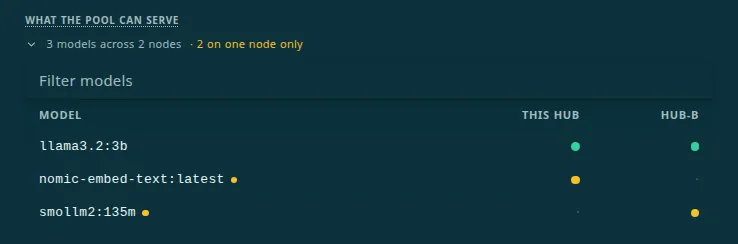
- The pool lists the peer’s models. What the pool can serve shows every model reported by reachable Hubs and which nodes hold each one. A model only one node holds carries a warning mark and is counted in the summary as on one node only — that is the kind of model to use for the test below.
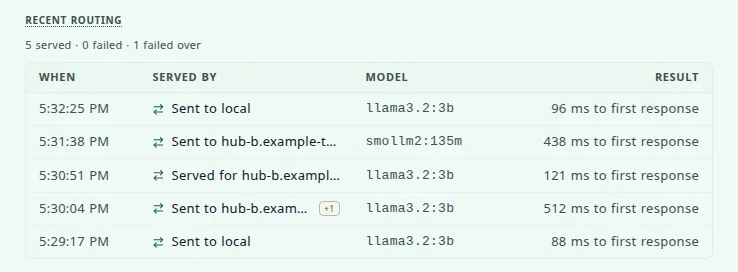
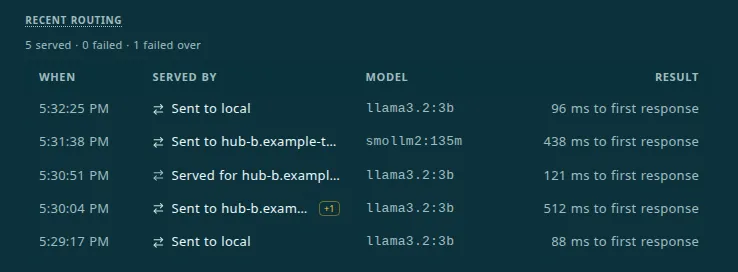
- Recent routing shows where requests were served. It lists the newest 25 decisions, newest first, from the last 200 the Hub keeps in memory. A restart clears the list.
- Ask for a model only the other Hub has. It answers. That is the whole feature in one test.
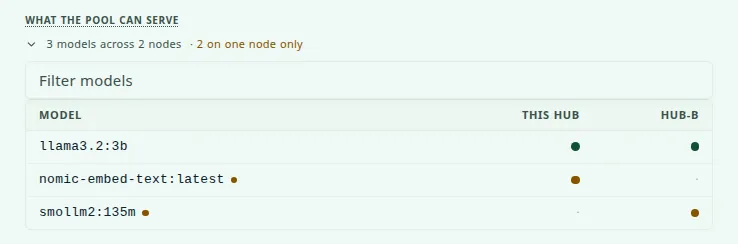
Every response that goes through the pool also names the node that served it in an X-Hub-Pool-Served-By header: local for this Hub, or the peer’s tailnet name. From a shell, cihub pool log prints the same decisions, calls out failovers, and says in words when the app closed its own connection. Resources in the top navigation shows each paired Hub as a card with its models, queue, and measured speed; see Resource Monitor.
What the badge says
| Badge | What it means |
|---|---|
| Routing | Pooling is on, this Hub may send work out, and at least one paired Hub is connected and switched on. |
| Local only | Pooling is on, but nothing can be sent out: no peer is connected yet, Send work to paired Hubs is off, or every paired Hub is switched off. A line under the badge says which. |
| Off | Pooling is switched off on this Hub, in Controls or by HUB_POOL_USER_DISABLED. |
How to read Recent routing
| You see | It means |
|---|---|
| Sent to a node | This Hub placed the request. Sent to local is a request your own engines served. |
| Served for a node | A peer sent the request here and your engines answered it. |
| +2 | The request failed over from two nodes first. Hover for each node and why it was passed over. |
| pin | A routing pin ordered the candidates. |
| 123 ms to first response | Served, and how long the first reply took. |
| Waiting for a first response | Placed, and the node has not started replying. |
| Refused · HTTP 400 | The node answered about the request itself. The app got that answer; fix the request, not the node. New in 0.3.0. |
| Bad output · node fault | The node answered 200 with nothing but <unusedN> placeholder tokens. New in 0.3.0. |
| Cut off · node fault | The node’s answer ended without its final frame. New in 0.3.0. |
| No node served this | Every candidate failed, and the row reads Sent to an unnamed node, or the app hung up before any node answered, and the row still names the node that was working on it. |
The line above the list counts served, failed, and failed over across the decisions the Hub holds.
What happens to your apps
By default every AI app on a Hub already talks to that Hub’s own pool proxy, even before you pair: an app’s CI_LLM_BASE_URL ends in /api/inference/pool/v1. With no peer, the proxy serves from your own engines, so nothing changes for the app. Pairing changes what the pool can serve, and so which model the Hub hands an app. The Hub regenerates the settings of the AI apps that this affects and restarts them about a minute after pool membership changes (two health checks), and it waits at least ten minutes before restarting the same app again on its own. An affected app is briefly unavailable while it restarts. In the logs (Settings → Logs, or cihub logs) look for routing app inference through this Hub's proxy.
If you would rather not wait, restart an app yourself. You never need to reinstall it or edit its configuration.
What looks broken and is not
The second Hub looks unused
This is the most common misreading, and it is the pool working as designed. Requests prefer the Hub they started on. Your local engines get first call on your own apps; a peer picks up the work they cannot serve, or work that would otherwise queue behind a busy engine.
The head start is not sentiment about your own hardware. A follow-up message in a conversation reuses the prompt and cache the previous turn left resident on that node, while the same message sent to a peer is processed from cold. Handing work sideways for its own sake would make the common case slower. If your local Hub is idle and its models cover what your apps ask for, a quiet peer means nothing is wrong. You can change the head start with Local affinity (queued requests) under Controls: 0 removes it, and an exact tie still goes to this Hub, since serving here costs no network hop.
A peer says Unreachable
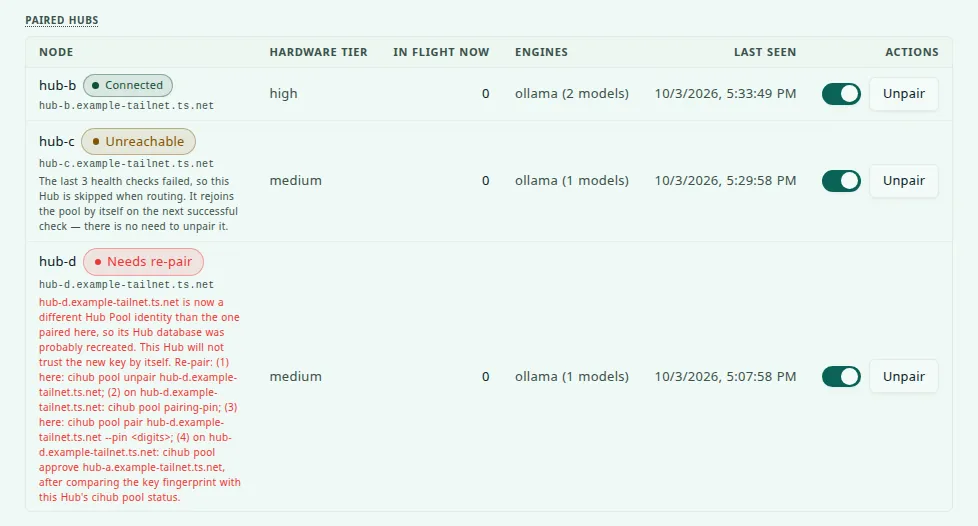
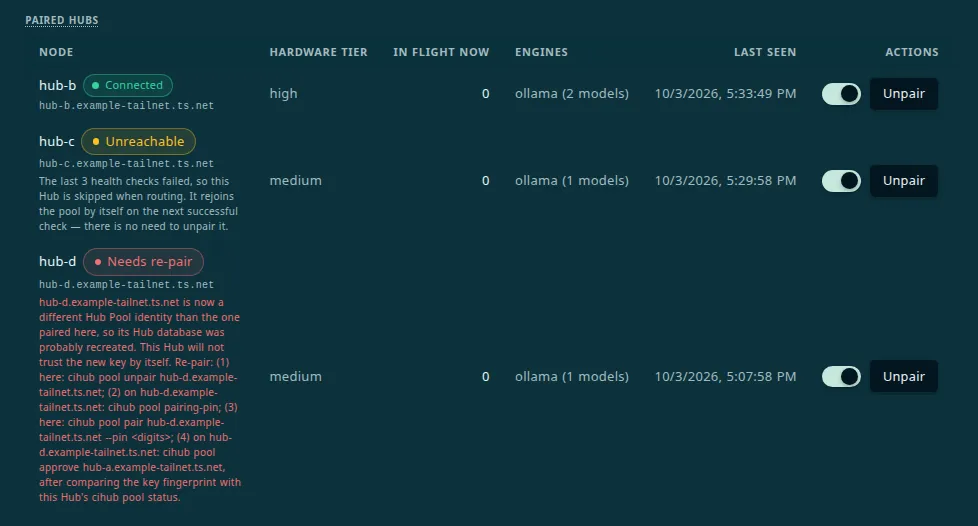
Each Hub probes its peers every 30 seconds. Three failures in a row mark that peer Unreachable, and it stops being offered as somewhere to send work. The pairing itself is untouched. The Hub keeps probing, and the first successful probe puts the peer back to Connected by itself.
Unpairing is not how you fix a Hub that was merely switched off. Bring it back and wait for the next probe; unpair only when you actually want it out.
Nothing changed after pairing
Give the apps a minute — see What happens to your apps — or restart the app.
What the two Hubs trust
Every connection between two Hubs is WireGuard-encrypted and device-authenticated by Tailscale before pooling looks at it. There is no certificate authority of your own and no discovery daemon underneath this, and that is the point of building on Tailscale. Pooling only has to answer one more question: is this the Hub I approved.
- Each Hub has an identity. On first use it creates a stable node ID and a signing key pair. It keeps its private key to itself and stores only each peer’s public key.
- Approval pins the peer. When you approve a request, the Hub ties that peer’s node ID to its public key. From then on, requests between the two Hubs carry a signature over the method, path, sender, recipient, a timestamp, and a one-time value, so a captured request cannot be replayed or sent to a different Hub. Signatures allow five minutes of clock skew, so keep both Hubs’ clocks accurate.
- The PIN protects the request, not your decision. A request that carries a PIN creates nothing on the receiving Hub unless the PIN is right, and the request then shows the sender’s key fingerprint. A request with no PIN still reaches your approval list with only a name attached, so approve only names you recognise. Either way the request lands as pending, and you still approve it.
- Older pairings upgrade themselves. A pairing from a Hub that predates signed requests keeps working with a bearer token. It shows a Legacy auth tag and moves to signed requests at the next health probe. Do not turn on
poolRequireSignedPeerswhile any peer shows Legacy auth, because that setting would cut it off in both directions. - The public identify route says almost nothing. A Hub answers only that it is a Companion Hub and which pool protocol version it speaks, until a request carries a correct PIN.
- A peer sees a summary of your Hub, not your apps. Each health check carries your hardware tier, the engines and model names you have, how many requests are in flight, whether you are taking work, and a few tuning numbers such as measured speeds. By default it also carries counts of the containers the Hub manages with their total CPU and memory, never their names;
poolShareContainerStatsin the pool settings API turns that off. Your prompts reach a peer only when a request is routed there.
Ports
Peers reach each other over HTTPS at https://<device>.<tailnet>.ts.net, which Tailscale Serve publishes on port 443. You open nothing on your router. cihub pool probe tries the Hub API port, 5002 by default, and only to find a Hub on your LAN.
Controls and turning pooling off
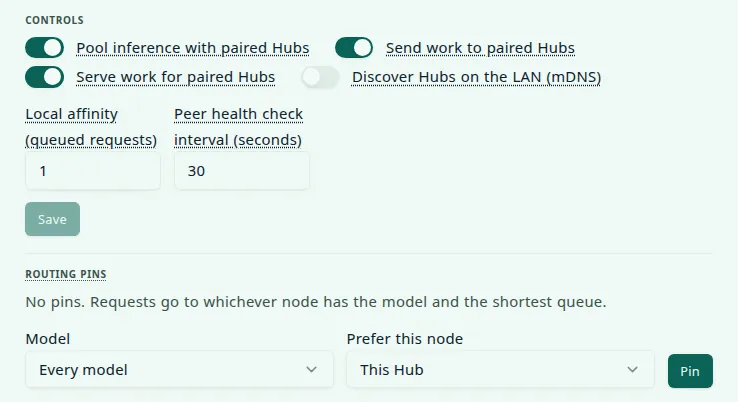
Under Settings → Network → Hub Pool → Controls. The switches apply as soon as you flip them; the two number fields need Save.
| Control | What it does |
|---|---|
| Pool inference with paired Hubs | The master switch. Off: every request stays on this Hub’s hardware, paired Hubs skip this node, and this Hub refuses new pairing requests and cannot mint a PIN. Pairings are kept |
| Send work to paired Hubs | Off: requests this Hub cannot serve fail here instead of being sent out |
| Serve work for paired Hubs | Off: paired Hubs see this Hub as healthy but not taking work (a paused tag on their side), and route elsewhere |
| Discover Hubs on the LAN (mDNS) | Off by default, and new in 0.3.0. On: lists Hubs announced on the LAN as Unverified, none of which can be paired from the list. See How Hubs find each other |
| Local affinity (queued requests) | The head start this Hub gives itself before handing work to a peer, from 0 to 20. The default is 1 |
| Peer health check interval | How often each peer is probed, from 10 to 300 seconds. The default is 30 |
| The switch in each peer’s row | Takes one peer in or out of the pool. The pairing is kept |
| Routing pins | Prefer one node for a model, or for everything. A pin moves that node to the front; it never forces a request and can never take inference down. Not applying right now marks a pin whose node is down or no longer holds the model |
Pairings are kept whichever switch you use, so turning pooling back on needs no re-approval. Unpair is the only control that removes a peer for good: it tells the other Hub to drop its half too, and if that Hub was off at the time, unpair there as well.
The operator kill switch lives in the Hub’s .env:
HUB_POOL_USER_DISABLED=trueRestart the stack. On that Hub, this stops requests being sent to peers, stops answering peers’ health probes so paired Hubs mark it unreachable and route around it, and refuses new pairing requests. Apps keep talking to this Hub’s own proxy, which now serves only from this Hub’s engines. As with any .env line, the desktop app drops this one on its next launch, so on a desktop-managed Hub use the in-app toggle instead. The flag wins over the in-app switch: Settings → Network → Hub Pool then shows Disabled in this Hub’s .env and locks the toggle. It is per Hub, so setting it on one appliance does not disable the other.
HUB_POOL_OUTBOUND_DISABLED=true and HUB_POOL_INBOUND_DISABLED=true do the same for one direction. Each locks its own switch and says so beside it.
Command reference
Run cihub --help for the Hub Pool group; cihub pool --help is not supported. The optional [env] argument only matters for a source checkout. A packaged install always uses its own data directory.
| Command | What it does |
|---|---|
cihub pool status | Whether pooling is routing, this node’s key fingerprint, and every peer. Names the cause under Peers refusing this Hub |
cihub pool doctor [--check-latency] | A read-only preflight in six sections: pool member checks, version, tailnet and Serve, peer probe budget, host bridge, and paired peers. --check-latency spends GPU time |
cihub pool discover | Unpaired Hubs from your tailnet and your CI Account |
cihub pool probe <address> | Whether a Hub answers at a LAN or tailnet address, and whether it can pair by address |
cihub pool pairing-pin, cihub pool cancel-pin | Mint the six digits another Hub needs, or revoke the outstanding PIN |
cihub pool pair <node-or-address> [--pin <digits>] [--name <label>] | Send a pairing request. An address needs --pin |
cihub pool peers | Paired and pending peers: id, status, last seen, queue, and models |
cihub pool approve <id>, cihub pool reject <id> | Answer a pending incoming request |
cihub pool unpair <id> | Remove a peer and revoke both tokens |
cihub pool peer-enable <id>, cihub pool peer-disable <id> | Take one peer in or out of the pool; the pairing is kept |
cihub pool enable, cihub pool disable [--outbound or --inbound] | Flip the stored switch for the whole pool or one direction. The .env override still wins |
cihub pool pin <node-or-local> [--model <id>], cihub pool unpin [--model <id>] | Prefer one node for a model, or for everything, and remove that preference |
cihub pool log [--limit N] | Recent routing decisions, 1 to 200, with failovers called out |
cihub pool ceiling <tokens or clear> | Advanced. Send prompts longer than this to another node when one can serve them. 1,024 to 1,048,576 |
cihub pool context-cap <tokens or clear> | Advanced. Cap the context size handed to this Hub’s apps at what the engine runs. 2,048 to 1,048,576 |
cihub pool slots <n or clear> | Advanced. State how many requests this node’s Ollama runs at once, for slot-aware placement. 1 to 64 |
cihub pool update | Pull the Hub image your install is pinned to and redeploy it. Despite the name it is not specific to pooling; see Updating |
Every command except doctor and update authenticates with the Hub’s own key, which cihub reads from the Hub’s data folder, so run it as the user that owns that folder. Under sudo it looks in the wrong home directory and reports No device key found. A key from cihub api-key create is not accepted here.
Troubleshooting
Pairing fails, or the request never appears
When Pair fails, Hub 0.3.0 does not tell you. The dashboard still flashes the green Pairing request sent. message, and then nothing appears under Pending requests, because the Hub removes the row when the handshake fails. The CLI prints a 500 with INTERNAL_SERVER_ERROR. If the request is not listed a few seconds after you select Pair, treat it as failed. The reason is in the sending Hub’s log (Settings → Logs, or cihub logs), on a line such as Peer refused the pairing PIN or Peer declined pairing request (403). The usual causes:
- The other Hub cannot be reached at its tailnet name. Pairing calls
https://<name>/with a ten-second budget. Confirm the name resolves from a device on the tailnet, HTTPS Certificates and MagicDNS are on, and the Hub is published by Tailscale Serve (see Before you start). Runcihub pool doctoron the receiving Hub. - The PIN was refused. It expired after ten minutes, was already used, was replaced by a newer one, died after five wrong guesses, or was shorter than six digits and so was never sent. Two failed attempts from one Hub also earn a cooling-off pause of a minute or more. Generate a fresh one.
- The name is not on the receiving Hub’s tailnet. A Hub turns away a request from a name that does not belong to its tailnet.
- Pooling is switched off on the receiving Hub. With the in-app switch or
HUB_POOL_USER_DISABLED, it refuses requests and cannot mint a PIN. - It already has your name. A second request from a name the receiving Hub already holds a row for is ignored, and so is sending to a name you already have a row for. Check Pending requests and Paired Hubs on both sides, then unpair and pair again.
- It is waiting, unapproved. A request that arrived stays under Pending requests until someone approves or rejects it, or 24 hours pass.
I approved, but the other Hub still says Waiting
Approving makes this Hub call back to the requesting Hub’s https://<name>/ to finish the pairing, and that call is not retried. If the requesting Hub is not published at its name, this Hub shows Connected while the other stays on Waiting for … to approve. This Hub’s log (Settings → Logs) then has a line that starts [HubPool] pairing confirmed locally but callback to, followed by the name and the reason. Fix the requesting Hub’s HTTPS and Serve setup, then select Cancel request there, Unpair here, and pair again.
No devices are discovered
- The other Hub is not on the tailnet, or is not running. Check Settings → Network on that Hub, and
tailscale statusfrom any device on the tailnet. - It is already paired or pending. Discovery only lists Hubs this one has no relationship with. Look under Paired Hubs and Pending requests.
- It is not a Companion Hub, or it does not answer at its name. Every candidate is probed at
https://<name>/first; only ones that answer as a Hub are listed. - It is in your CI Account but has not reported a Tailscale name. Hubs check in about once an hour. Or pair by address and PIN.
- The Hub has no Tailscale API credential. That only limits discovery to what this Hub’s own Tailscale daemon and your CI Account name. Add the credential, or pair from the other Hub and approve it here.
A peer is stuck on Unreachable
Work through the causes in order: the other Hub is off or rebooting; Tailscale is not connected there; it is no longer published at its name; pooling is disabled there with HUB_POOL_USER_DISABLED (which is exactly what that flag is meant to look like from outside). Once it is genuinely back, it rejoins on the next successful probe.
If it stays unreachable although it is up, the peer may be refusing this Hub: its identity changed, for example after its database was recreated, or the two clocks differ by more than five minutes. A peer that answers but refuses this Hub is probed less and less often, up to every 15 minutes, so a fix can take that long to show. A peer whose identity changed shows a red Needs re-pair badge at once, with the commands to run beneath it, because that state does not clear by waiting. A peer that refuses this Hub’s credentials for another reason stays Unreachable with a sentence beneath it that names the next command. cihub pool status names the cause under Peers refusing this Hub. For a changed identity, unpair on this Hub, mint a PIN on the peer with cihub pool pairing-pin, then pair again with cihub pool pair <peer> --pin <digits> and approve on the peer.
Apps started failing after you paired
- No reachable node has the model. The pool answers with a 502 saying
No pool node currently has model "…" available, and adds what it found when it checked your own engines. Pull that model on this Hub, or bring the peer that holds it back. Model names must match exactly, tag included. - Every node that had the model failed. The 502 reads
All <n> pool candidates for model "…" failedfollowed by the last reason. When a node simply took too long, it readsNo pool candidate answered for model "…" within its deadlineand says that a deadline is not proof the nodes are down. - The app asked for
autoand the pool has no chat model. The 502 says no chat model on this Hub or its connected peers can stand in forauto. Load a chat model on any pool node, or ask for one by name. - A new peer’s models are missing. They arrive with the peer’s first health check, up to about 30 seconds after pairing. If they stay missing, check that the peer’s row does not say Disabled or show a paused tag, and that its engine is healthy.
- The app is slow to start answering. A long prompt can take minutes to reach the first token on a CPU node, and an app with a short read timeout gives up first. In Recent routing that is a No node served this row that still names the node that was working on it, and
cihub pool logsays the app closed its connection. - You call the pool yourself and get a 401. A request from outside the Hub’s own network needs an
inferencekey:cihub api-key create --name <label> --scope inference, sent asAuthorization: Bearer <key>. A request with nomodelfield gets a 400. - To rule pooling out entirely, set
HUB_POOL_USER_DISABLED=true, restart the stack, restart the app, and see whether the problem survives. If it does, pooling was not the cause.
Limits today
| What you might expect | Where it stands |
|---|---|
| Two GPUs serving one request | Not planned. See What pooling does not do. |
| Pooling across two different tailnets | Not supported. Pairing and every pooled request go to the peer’s name on your own tailnet. |
| Pooling over a plain LAN with no Tailscale | Not supported. A LAN address can find a Hub, but pairing then switches to its tailnet name. |
| A permanent history of where requests were served | The Hub keeps the last 200 decisions in memory and clears them when it restarts. The page shows the newest 25. |
| Placement by GPU pressure, prompt-prefix affinity, or slots | Available but off by default. GPU pressure reads AMD GPUs only. There is no switch in the dashboard or the CLI; they are set through the Hub’s pool settings API. |
| Model management across the pool | Left out on purpose. Pulling a model stays a node-local action. |